Base64 Decode
#!/usr/bin/exec-suid -- /bin/python3 -I

import sys

import base64

print("Enter the password:")
entered_password = sys.stdin.buffer.read1()
correct_password = b"iAb/uzx0uJQ="

print(f"Read {len(entered_password)} bytes.")

correct_password = base64.b64decode(correct_password.decode("l1"))

if entered_password == correct_password:
    print("Congrats! Here is your flag:")
    print(open("/flag").read().strip())
else:
    print("Incorrect!")
    sys.exit(1)
The script reads raw bytes from stdin and compares them against a decoded version of correct_password = b"iAb/uzx0uJQ="
if the input matches, it prints the flag
we can use base64 terminal utility
echo "iAb/uzx0uJQ=" | base64 --decode | /challenge/runme
or the python3 base64 module:
import base64
print(base64.b64decode("iAb/uzx0uJQ=")
Alternatively, use Python to send the bytes:
import subprocess
subprocess.run(["./script_name"], input=b'\x88\x06\xff\xbb<t\xb8\x94', check=True)
Base64 Decode
import base64

print("Enter the password:")
entered_password = sys.stdin.buffer.read1()
correct_password = b"\xeaM'\x8f\xa1\xa5\xfb\xe5"

print(f"Read {len(entered_password)} bytes.")

entered_password = base64.b64decode(entered_password.decode("l1"))

if entered_password == correct_password:
    print("Congrats! Here is your flag:")
    print(open("/flag").read().strip())
else:
    print("Incorrect!")
    sys.exit(1)
Using python:
import base64

# Raw bytes (escape hex sequences)
raw_bytes = b'\xeaM\'\x8f\xa1\xa5\xfb\xe5'

# Encode to Base64
base64_encoded = base64.b64encode(raw_bytes).decode('utf-8')
print(base64_encoded)
Using Terminal
echo -n -e '\xea\x4d\x27\x8f\xa1\xa5\xfb\xe5' > raw_bytes.bin
base64 raw_bytes.bin
echo -n -e '\xea\x4d\x27\x8f\xa1\xa5\xfb\xe5' | base64
Binary and Hex Encoding
#!/usr/bin/exec-suid -- /bin/python3 -I

import sys

print("Enter the password:")
entered_password = sys.stdin.buffer.read1()
correct_password = b"\xf8"

print(f"Read {len(entered_password)} bytes.")

entered_password = bytes.fromhex(entered_password.decode("l1"))

if entered_password == correct_password:
    print("Congrats! Here is your flag:")
    print(open("/flag").read().strip())
else:
    print("Incorrect!")
    sys.exit(1)
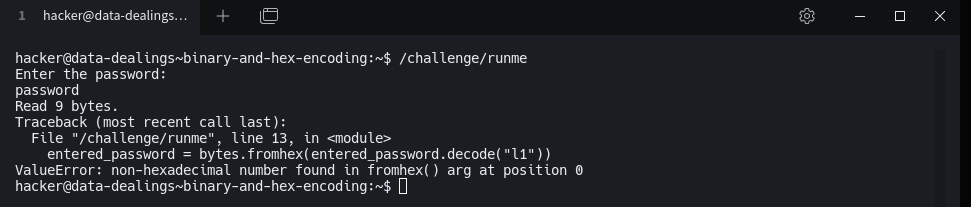
The challenge prompts the user to enter password via standard input. It reads the inputs as bytes, decodes it using Latin-1 encoding, and then converts it from hexadecimal to bytes.
The scripts expects a hex-encoded string that, when decoded, matches the byte /xf8
The correct password is the hex representation of \xf8 is f8
Decoding Hex
NOTE: One of the toughest parts of this challenge is to send raw binary data to it stdin. There are a few ways to do this:
- Write a python script to output data to stdout and pipe that to the challenge's stdin!
This would involve using the raw byte interface to stdout:
sys.stdout.buffer.write(). - Write a python script to run the challenge and interact with it directly.
Our recommendation is to use pwntools for this:
import pwn,p = pwn.process("/challenge/runme"),p.write(), andp.readall(). A pwn.college alumni has created an awesome pwntools cheat sheet that you may reference. - For an increasingly hacky solution,
echo -e -n "\xAA\xBB"will print out bytes to stdout that you can pipe.
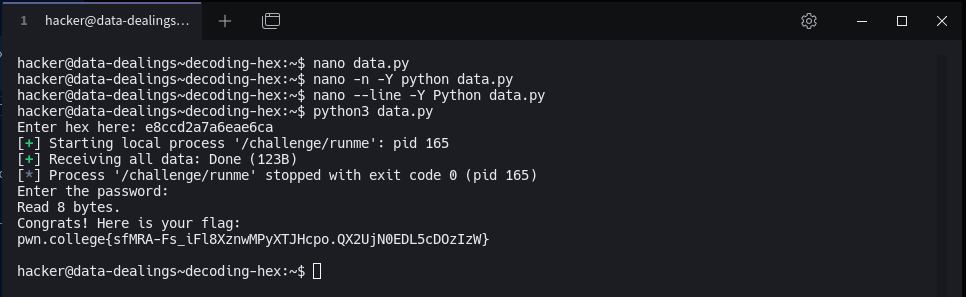
from pwn import *

# Take input from user
hex_input = input("Enter hex string: ")

# Decode from hex to raw bytes
raw_bytes = bytes.fromhex(hex_input)

# Start the process
p = process('/challenge/runme')

# Send the raw bytes
p.send(raw_bytes)

# Print the output
print(p.recvall().decode())
Decoding Practice
How many bases can you hold in your head? Here, we explore binary encoding of input
#!/usr/bin/exec-suid -- /bin/python3 -I

import sys

def decode_from_bits(s):
    s = s.decode("latin1")
    assert set(s) <= {"0", "1"}, "non-binary characters found in bitstream!"
    assert len(s) % 8 == 0, "must enter data in complete bytes (each byte is 8 bits)"
    return int.to_bytes(int(s, 2), length=len(s) // 8, byteorder="big")

print("Enter the password:")
entered_password = sys.stdin.buffer.read1()
correct_password = b"1010000010000000111000001100010010010111100011011100111111100101"

print(f"Read {len(entered_password)} bytes.")

correct_password = decode_from_bits(correct_password)

if entered_password == correct_password:
    print("Congrats! Here is your flag:")
    print(open("/flag").read().strip())
else:
    print("Incorrect!")
    sys.exit(1)
We will use python to convert the binary string into an integer, interpreting it as base2:
int(binary_str, 2)
The we need to convert the integers into bytes that uses big endian:
.to_bytes(len(binary_str) // 8, byteorder="big")
full script using pwntools:
from pwn import *

binary_str = "1010000010000000111000001100010010010111100011011100111111100101"
raw_bytes = int(binary_str, 2).to_bytes(len(binary_str) // 8, byteorder="big")

p = process('/challenge/runme')
p.send(raw_bytes)
print(p.recvall().decode())
Enters: emoji
#!/usr/bin/exec-suid -- /bin/python3 -I

import sys

try:
    entered_password = open(sys.argv[1], "rb").read()
except FileNotFoundError:
    print("Input file not found...")
    sys.exit(1)
correct_password = "📎 💨 🍘 🚟".encode("utf-8")

print(f"Read {len(entered_password)} bytes.")

entered_password = bytes.fromhex(entered_password.decode("l1"))

if entered_password == correct_password:
    print("Congrats! Here is your flag:")
    print(open("/flag").read().strip())
else:
    print("Incorrect!")
    sys.exit(1)
we can use .encode("utf-8") method and then take the raw bytes and turn them into hex with .hex() to solve this
import subprocess
subprocess.run(["/challenge/runme"], input="📎 💨 🍘 🚟".encode("utf-8").hex().encode())
Hex Nested
#!/usr/bin/exec-suid -- /bin/python3 -I

import sys

try:
    entered_password = open(sys.argv[1], "rb").read()
except FileNotFoundError:
    print("Input file not found...")
    sys.exit(1)
correct_password = b"ecdgbwfi"

print(f"Read {len(entered_password)} bytes.")

entered_password = bytes.fromhex(entered_password.decode("l1"))
entered_password = bytes.fromhex(entered_password.decode("l1"))
entered_password = bytes.fromhex(entered_password.decode("l1"))
entered_password = bytes.fromhex(entered_password.decode("l1"))

if entered_password == correct_password:
    print("Congrats! Here is your flag:")
    print(open("/flag").read().strip())
else:
    print("Incorrect!")
    sys.exit(1)
- Reads a file (binary mode)
- Decodes its contents 4 times using:
entered_password = bytes.fromhex(entered_password.decode("l1"))
l1 is just latin-1 encoding
-
Compares the final result to the correct password :
correct_password = b"ecdgbwfi"
Our task: create an input file that, after 4 rounds of this decoding process, matches the correct password
For each byte, get its 2-charater lowercase hex string
Repeat this for 4 iterations, starting from ecdgbwfi
Bytes>hex string>latin-1
solution script:
#!/usr/bin/env python3
from pwn import *
import tempfile

# Step 1 — starting from correct password
target = b"ecdgbwfi"

def reverse_fromhex(b):
    """Reverse bytes.fromhex() by converting each byte to its 2-digit lowercase hex string."""
    return "".join(f"{byte:02x}" for byte in b).encode("latin1")

# Apply reverse step 4 times to get original file content
data = target
for _ in range(4):
    data = reverse_fromhex(data)

# Step 2 — write bytes to a temporary file
tmp = tempfile.NamedTemporaryFile(delete=False)
tmp.write(data)
tmp.flush()
tmp_name = tmp.name
tmp.close()

# Step 3 — run the challenge binary with the file path
p = process(["/challenge/runme", tmp_name])
print(p.recvall().decode())
hacker@module-2-challenges~password-hex-nested:~$ python3 data.py
[+] Starting local process '/challenge/runme': pid 226
[+] Receiving all data: Done (105B)
[*] Process '/challenge/runme' stopped with exit code 0 (pid 226)
Read 128 bytes.
Congrats! Here is your flag:
pwn.college{0PHQvtE8HWedWOZINCD1brBiQOp.QXwYjN0EDL5cDOzIzW}
Hex reverse
#!/usr/bin/exec-suid -- /bin/python3 -I

import sys

def reverse_string(s):
    return s[::-1]

print("Enter the password:")
entered_password = sys.stdin.buffer.read1()
correct_password = b"\x9f\x8d(S[2D\xe5"

print(f"Read {len(entered_password)} bytes.")

entered_password = entered_password[::-1]
entered_password = bytes.fromhex(entered_password.decode("l1"))

if entered_password == correct_password:
    print("Congrats! Here is your flag:")
    print(open("/flag").read().strip())
else:
    print("Incorrect!")
    sys.exit(1)
The correct password:
correct_password = b"\x9f\x8d(S[2D\xe5"
correct_password.hex()
# '9f8d28535b3244e5'
Reverse the hex string:
We can’t reverse the bytes of 9f8d28535b3244e5 directly as a string of characters, we must reverse character-by-character because that’s what the script will reverse begore decoding
hex_str = "9f8d28535b3244e5"
payload_str = hex_str[::-1]
payload_str
# '5e4423b53S582d8f9'   <-- See that 'S'? That's actually part of "53"
The “S” shows up because when you take the hex string 53 and interpret it in latin-1 you get ‘S’
That is:
5e 44 23 b5 35 82 d8 f9in hex (your raw stdin bytes).- The script will reverse them →
"9f8d28535b3244e5". - Decode as Latin-1 →
"9f8d28535b3244e5". fromhex()→b"\x9f\x8d(S[2D\xe5".
Hex-encoding ASCII
A string is a sequence of characters that a human might write down, read, speak or even dream. This includes things like letters of the alphabet but also things like 👺.
The representation of human-readable character as a bunch of bytes in memory is yet another Encoding
In Python, you can convert a str to its equivalent bytes by doing my_string.encode() . If you have
a bunch of bytes that you want to interpret as a string, you can do my_bytes.decode().
But how are string characters mapped to byte values?. Enter ASCII
ASCII is pretty simple: every character is one byte, uppercase letters are 0x40+letter_index for example 0x41 is A . Lowercase letters are 0x60+letter_index
In this challenge, we want you to give us ascii-encoded hex values and we will match them against the password
#!/usr/bin/exec-suid -- /bin/python3 -I

import sys

print("Enter the password:")
entered_password = sys.stdin.buffer.read1()
correct_password = b"crxtrkwn"

print(f"Read {len(entered_password)} bytes.")

entered_password = bytes.fromhex(entered_password.decode("l1"))

if entered_password == correct_password:
    print("Congrats! Here is your flag:")
    print(open("/flag").read().strip())
else:
    print("Incorrect!")
    sys.exit(1)
The correct password is (in bytes):
correct_password = b"crxtrkwn"
We can use Python .hex() method to encode the password
b"crxtrkwn".hex()
Which will yield:
'63727874726b776e'
Another method we can use is ASCII table:
| Character | ASCII Decimal | ASCII Hex |
|---|---|---|
| c | 99 | 63 |
| r | 114 | 72 |
| x | 120 | 78 |
| t | 116 | 74 |
| r | 114 | 72 |
| k | 107 | 6b |
| w | 119 | 77 |
| n | 110 | 6e |
More Hex
#!/usr/bin/exec-suid -- /bin/python3 -I

import sys

print("Enter the password:")
entered_password = sys.stdin.buffer.read1()
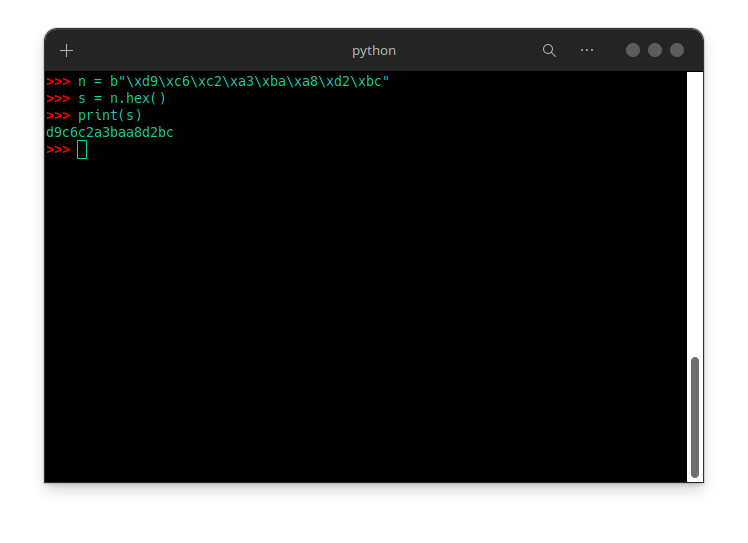
correct_password = b"\xd9\xc6\xc2\xa3\xba\xa8\xd2\xbc"

print(f"Read {len(entered_password)} bytes.")

entered_password = bytes.fromhex(entered_password.decode("l1"))

if entered_password == correct_password:
    print("Congrats! Here is your flag:")
    print(open("/flag").read().strip())
else:
    print("Incorrect!")
    sys.exit(1)
The solution is staring at us..lol
My turn
#!/usr/bin/exec-suid -- /bin/python3 -I

import sys

def decode_from_bits(s):
    s = s.decode("latin1")
    assert set(s) <= {"0", "1"}, "non-binary characters found in bitstream!"
    assert len(s) % 8 == 0, "must enter data in complete bytes (each byte is 8 bits)"
    return int.to_bytes(int(s, 2), length=len(s) // 8, byteorder="big")

print("Enter the password:")
entered_password = sys.stdin.buffer.read1()
correct_password = b"\xbc\xe0\xaa\xb2\xde\xee\x98\x9f"

print(f"Read {len(entered_password)} bytes.")

entered_password = decode_from_bits(entered_password)

if entered_password == correct_password:
    print("Congrats! Here is your flag:")
    print(open("/flag").read().strip())
else:
    print("Incorrect!")
    sys.exit(1)
All we need to do is encode the raw_bytes into binary
data = b"\xbc\xe0\xaa\xb2\xde\xee\x98\x9f"
binary_str = ''.join(f'{byte:08b}' for byte in data)
print(binary_str)
I took the bytes b"\xbc\xe0\xaa\xb2\xde\xee\x98\x9f" and converted each byte to its 8-bit binary representation using Python’s string formatting (f'{byte:08b}'). Then, I joined all these binary strings together to form one long binary string. This gives you a sequence of 0s and 1s that represents the original bytes in binary form.
Newline Troubles
The previous challenges were quite simple, as is this one.
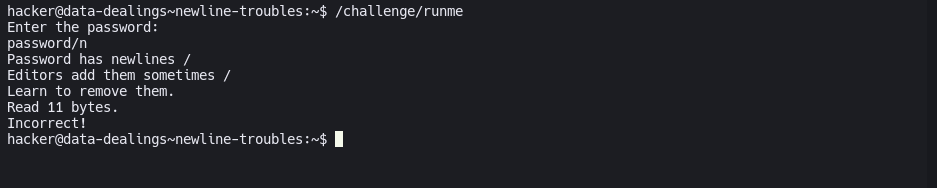
But it does one thing slightly differently: it does not ignore the Enter that you press on the terminal when entering your password.
This causes your entered_password to contain a newline, and since correct_password has no newline, the comparison fails!
- Look into ways to terminate your terminal input without pressing Enter. This is super searchable online!
- Recall, from the Linux Luminarium, how to redirect an
echo(with arguments to disable newlines) to the stdin of/challenge/runme. - Create a file without a newline, and remember your Linux Luminarium to redirect the file to stdin of
/challenge/runme.
#!/usr/bin/exec-suid -- /bin/python3 -I

import sys

print("Enter the password:")
entered_password = sys.stdin.buffer.read1()
if b"\n" in entered_password:
    print("Password has newlines /")
    print("Editors add them sometimes /")
    print("Learn to remove them.")

correct_password = b"phsbvmrn"

print(f"Read {len(entered_password)} bytes.")

if entered_password == correct_password:
    print("Congrats! Here is your flag:")
    print(open("/flag").read().strip())
else:
    print("Incorrect!")
    sys.exit(1)
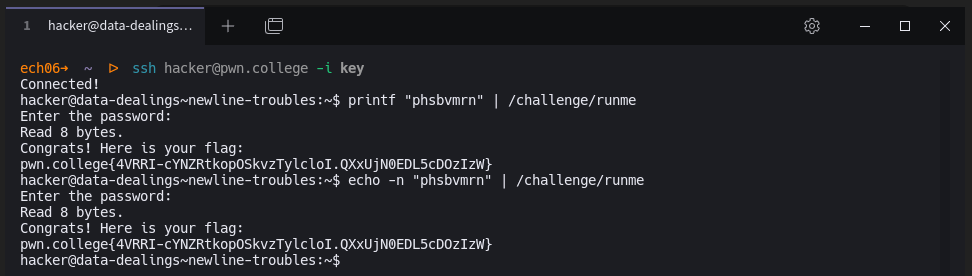
We can still see the correct password here but we need to find a way to terminate the newline
solution 1:
https://askubuntu.com/questions/118548/how-do-i-end-standard-input-without-a-newline-character
If you do not want to append a newline to your input, just press Ctrl-D twice after you input password, it will be reversed in the same line:

solution 2:
Using echo and printf
Obfuscate 1
import sys

import base64

def reverse_string(s):
    return s[::-1]

print("Enter the password:")
entered_password = sys.stdin.buffer.read1()
correct_password = b"2n\x97\x13\x18\xa5\xd5\xef"

print(f"Read {len(entered_password)} bytes.")

correct_password = correct_password[::-1]
correct_password = base64.b64encode(correct_password)
correct_password = base64.b64encode(correct_password)
correct_password = correct_password.hex().encode("l1")

if entered_password == correct_password:
    print("Congrats! Here is your flag:")
    print(open("/flag").read().strip())
else:
    print("Incorrect!")
    sys.exit(1)
First we need to reverse the bytes in correct_password variable
import base64

correct_password = b"2n\x97\x13\x18\xa5\xd5\xef"
correct_password = correct_password[::-1]
Then base64 encode twice:
correct_password = base64.b64encode(correct_password)
correct_password = base64.b64dencode(correct_password)
Then convert to hex string:
correct_password = correct_password.hex().encode('latin-1')
Quick “why this works”
The script does:
- reverse the original 8 bytes
- Base64-encode twice
- take the ASCII result and hex-encode it
- encode with
"l1"(alias of latin-1 → same bytes)
I recomputed programmatically and the final ASCII hex string is 4e7a6c586245644354316869616b6b39.
One-liners to get the flag
Bash:
Obfuscate 2
#!/usr/bin/exec-suid -- /bin/python3 -I

import sys

import base64

def reverse_string(s):
    return s[::-1]

print("Enter the password:")
entered_password = sys.stdin.buffer.read1()
correct_password = b"\xe9\x16\x01:[\r\xe3\x19"

print(f"Read {len(entered_password)} bytes.")

entered_password = entered_password[::-1]
entered_password = base64.b64decode(entered_password.decode("l1"))
entered_password = bytes.fromhex(entered_password.decode("l1"))
entered_password = bytes.fromhex(entered_password.decode("l1"))

correct_password = correct_password[::-1]
correct_password = correct_password[::-1]
correct_password = base64.b64encode(correct_password)
correct_password = correct_password.hex().encode("l1")

if entered_password == correct_password:
    print("Congrats! Here is your flag:")
    print(open("/flag").read().strip())
else:
    print("Incorrect!")
    sys.exit(1)
Program logic:
- Reads input bytes
- Transforms input:
- Reverse string
- BAse64 decode
- Hex decode
- Hex decode again
- Transforms the stored password:
- Base64 encode the result
- Hex encode the result
- Compares the two
Solution:
payload = reverse( base64encode( hex( hex( target ) ) ) )
PWNtools:
from pwn import *
import base64, binascii

# Build the “wire” payload exactly once:
T  = b'365259424f6c734e34786b3d'
S1 = binascii.hexlify(T).decode('latin-1')
S2 = binascii.hexlify(S1.encode('latin-1')).decode('latin-1')
payload = base64.b64encode(S2.encode('latin-1'))[::-1]

p = process('/challenge/runme')
p.send(payload)          # no newline
print(p.recvall().decode('latin-1', 'ignore'))
The program reverses the input, base64-decodes it, then hex-decodes twice before comparing with the transformed password. Reversing this, we must double-hex encode the target, base64-encode it, then reverse. Using Python, we build the payload:
import base64, binascii
T=b'365259424f6c734e34786b3d'
S2=binascii.hexlify(binascii.hexlify(T)).decode()
print(base64.b64encode(S2.encode())[::-1].decode())
Reasoning about files
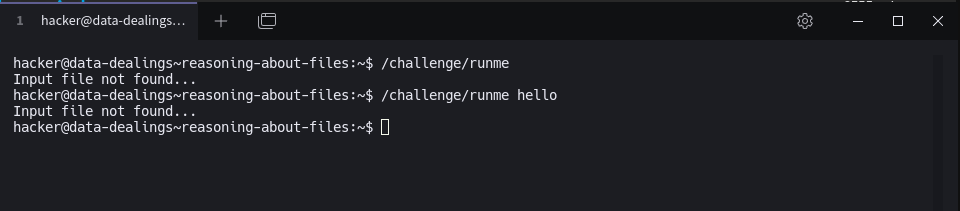
Let's explore some other ways programs might take security-relevant input. Here, the program does not read the password from the terminal. Can you still crack it?
#!/usr/bin/exec-suid -- /bin/python3 -I

import sys

try:
    entered_password = open("ncrm", "rb").read()
except FileNotFoundError:
    print("Input file not found...")
    sys.exit(1)
if b"\n" in entered_password:
    print("Password has newlines /")
    print("Editors add them sometimes /")
    print("Learn to remove them.")

correct_password = b"ofjodbmb"

print(f"Read {len(entered_password)} bytes.")

if entered_password == correct_password:
    print("Congrats! Here is your flag:")
    print(open("/flag").read().strip())
else:
    print("Incorrect!")
    sys.exit(1)
We can see that the script reads the password from a file name ncrm then it compares the raw bytes in ncrm to correct_password = b"ofjodbmb”
So we can :
printf "password" > file
then run the challenge again

Specifying filenames
Here's another slight twist on it. Can you still get it?
print "password" > pass
/challenge/runme pass
simple as that
Unicode confusion
#!/usr/bin/exec-suid -- /bin/python3 -I

import sys

try:
    entered_password = open("eovv", "rb").read()
except FileNotFoundError:
    print("Input file not found...")
    sys.exit(1)
correct_password = b"bseddhtm"

print(f"Read {len(entered_password)} bytes.")

assert entered_password != correct_password

entered_password = entered_password.decode("utf-16")
entered_password = entered_password.encode("latin1")

if entered_password == correct_password:
    print("Congrats! Here is your flag:")
    print(open("/flag").read().strip())
else:
    print("Incorrect!")
    sys.exit(1)
The challenge script reads a password from a file eovv and compares it to a hardcoded b”bseddhtm” .
However, it introduces an encoding mismatch vulnerability:
- It first checks that the raw bytes from
eovvare not equal to the correct password (assertion). - Then it decodes the bytes as UTF-16 (likely little-endian).
- Then it re-encodes them as Latin-1 before doing the final password check.
This allows an attacker to supply bytes that are different from the correct password in raw form, but decode/encode into the correct password during the later comparison.
Root Cause
- UTF-16 decoding: Each ASCII character is represented as two bytes (char +
0x00). - Latin-1 encoding: Directly maps each character’s code point to a byte.
- This mismatch means we can construct a UTF-16LE encoded string of
"bseddhtm"— which will pass the assert but still match after decoding and re-encoding.
Exploit Steps
-
Generate the payload: UTF-16LE bytes for
"bseddhtm"without BOM.python CopyEdit payload = b''.join(bytes([ord(c), 0]) for c in "bseddhtm") open("eovv", "wb").write(payload) -
Run the challenge script.
-
The check passes because:
raw_bytes != b"bseddhtm"✅(raw_bytes).decode("utf-16").encode("latin1") == b"bseddhtm"✅
Payload in Hex
CopyEdit
62 00 73 00 65 00 64 00 64 00 68 00 74 00 6d 00
What’s the password?
The program lives in /challenge/runme, and will request a tricky password before it gives you the flag. It's going to be the simplest program you read in your journey, as it just reads data over standard input and makes one simple check.
Read the program, understand the Python, and make the program give you the flag!

Here is the python code:
#!/usr/bin/exec-suid -- /bin/python3 -I

import sys

print("Enter the password:")
entered_password = sys.stdin.buffer.read1().strip()
correct_password = b"buffihei"

print(f"Read {len(entered_password)} bytes.")

if entered_password == correct_password:
    print("Congrats! Here is your flag:")
    print(open("/flag").read().strip())
else:
    print("Incorrect!")
    sys.exit(1)
We can see the correct password is : buffihei

… and again!
Once more into the breach, dear hacker! Just to make sure you get the idea.
code:
#!/usr/bin/exec-suid -- /bin/python3 -I

import sys

print("Enter the password:")
entered_password = sys.stdin.buffer.read1().strip()
correct_password = b"fbharpsp"

print(f"Read {len(entered_password)} bytes.")

if entered_password == correct_password:
    print("Congrats! Here is your flag:")
    print(open("/flag").read().strip())
else:
    print("Incorrect!")
    sys.exit(1)
password:
fbharpsp
